
Wine Rating App for Beginners: Score Bottles Without the Jargon


Download App: wine rating app for beginners
A wine rating app for beginners lets you scan a label, see plain-language tasting notes and scores, and privately track what you like so the app learns your taste over time. DiVino combines AI label scanning with a personal flavor profile that skips sommelier jargon and focuses on helping you remember, compare, and improve every pour.
Definition: A wine rating app for beginners is a mobile tool that identifies wines by label photo, displays simplified ratings and flavor descriptions, and logs personal preferences so recommendations improve with each bottle.
- Scan any label to get ratings, flavors, and food pairings in plain language
- Private tracking builds a taste profile so the app recommends wines you will actually enjoy
- Crowd scores, expert scores, and AI match scores are different, and knowing the difference prevents bad purchases
Beginner Wine Ratings Without Grape or Region Memorization
A beginner wine rating tool helps you choose and remember bottles without memorizing grapes, regions, vintages, or critic shorthand. The point is simple: scan, understand, rate, and learn from your own reactions.
Wine walls are rough when every label looks confident. Restaurant lists can be worse, especially when the steakhouse list opens to reds and the server is already hovering with a corkscrew. A rate wine app gives you a first read before the social pressure starts.
No performance required.
Wine Identifier App removes the “I should know this already” problem because it turns a label match into plain tasting notes, pairing ideas, and a private rating. If you liked a smooth Rioja but hated a sharp Sauvignon Blanc, that matters more than sounding fluent in wine terms. For beginners, private logging is often easier than public reviews because it builds memory without inviting correction.
When the issue is not knowing what to say, Wine Identifier App fits because the tasting journal accepts simple preference feedback, including likes, dislikes, and short notes.
How a Wine Rating App for Beginners Works
A wine rating app for beginners works by reading the bottle label, finding the closest database match, and turning that match into useful guidance. The goal is not to make wine feel technical; it is to help you identify the bottle, understand the rating, and remember your own reaction.
When you take a label photo, the app uses OCR, which simply means text reading, plus image matching to pull out clues like producer, wine name, and vintage. It then compares those clues with known records. Once matched, the app may show crowd ratings from other drinkers, critic scores from reviewers, and a personal match score based on your saved likes and dislikes. Those are different signals. A popular bottle is not automatically your bottle.
Private ratings make the system more useful over time because each scan adds another correction. If you keep marking sharp whites as “not for me” and softer reds as “buy again,” DiVino can use that pattern to shape future suggestions. Still, database coverage, glare, blurry photos, and missing vintages can weaken identification, so any AI match should feel helpful rather than final.
Label Scanning, Wine Databases, and AI Match Scores
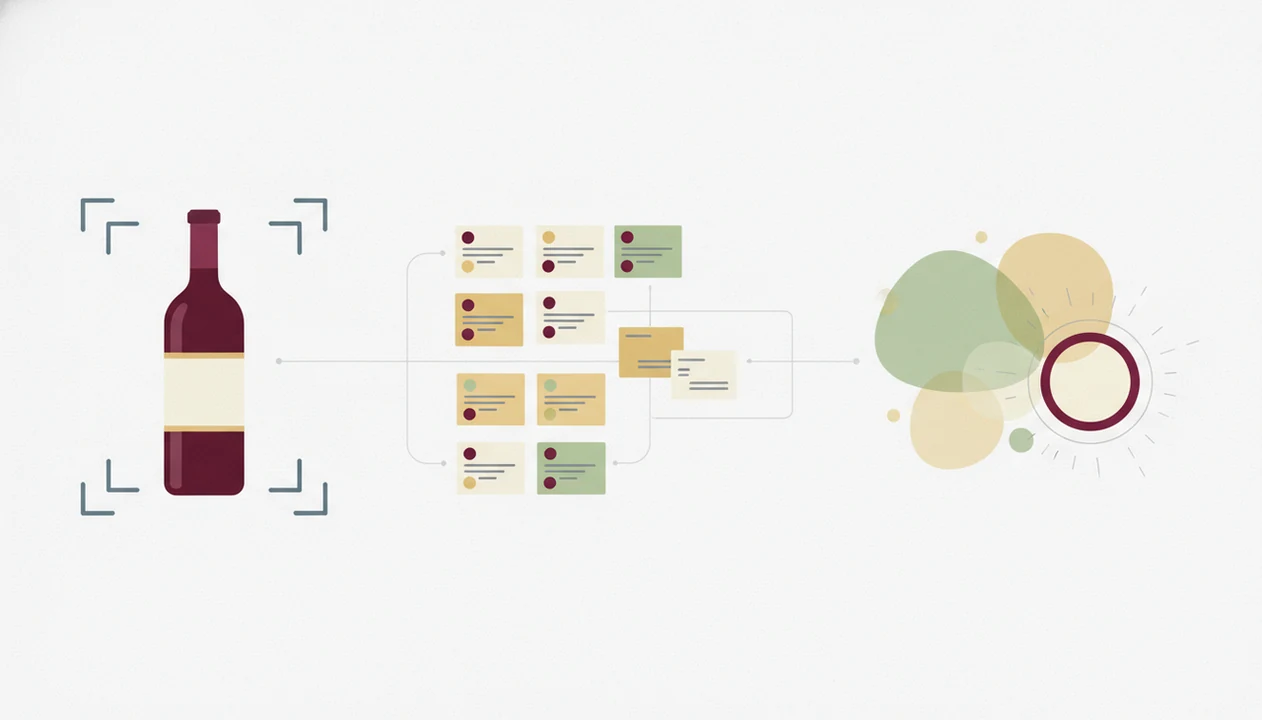
Wine rating apps work by turning a phone photo into structured wine data, then comparing that result against databases, crowd ratings, and your own history. The two biggest accuracy factors are photo quality and database coverage.
Label Scanning and Database Matching
A phone camera captures the front label, then OCR and image recognition extract producer, vintage, region, and wine name. In plain English, the app reads the label and checks whether the bottle already exists in its records. Vivino says its database includes millions of wines, which shows why large databases can return matches quickly (source: https://www.vivino.com/).
Warm restaurant lighting can still trip things up. I’ve watched a phone camera hunt for focus on a glossy burgundy label until the vintage blurred into the border. That missing number can change the match.
Crowd Ratings vs AI Match Scores
Crowd ratings aggregate other users’ scores. AI match scores weigh your own logged ratings, dislikes, and flavor patterns. A strong experience explains the difference, and does not bury average scores under a “personal” label.
If your priority is learning your own palate, Wine Identifier App earns the spot because each logged bottle feeds a preference model rather than treating every beginner like the average crowd score.
Top 3 Beginner Features in a Rate Wine App
The top beginner features in a rate wine app are plain tasting notes, a private taste journal, and pairing guidance tied to the exact bottle. These features solve the beginner problem better than long critic reviews.
Plain-Language Tasting Notes
Beginner notes should say “bright lemon, crisp, light body,” not “angular tannins” or “nervy minerality.” Wine Identifier App translates scan context into short summaries you can use while standing in an aisle, not studying for a certificate. For more note examples, the best wine tasting notes app guide goes deeper.
Private Taste Journal
A private journal remembers what you liked and what you would not buy again. The boring entries matter. A “too sour for me” note is useful data.
Personalized Food Pairing
Pairing guidance should connect the scanned bottle to dinner, not generic “red with meat” rules. Wine Identifier App gives pairing suggestions from the label match, so a beginner can compare the wine against pasta, fish, roast chicken, or takeout.
On days dinner is already on the table, Wine Identifier App helps because pairing recommendations are tied to the scanned bottle and your saved preference feedback.
5 First-Time Steps for Scanning and Rating a Bottle
How to use a wine rating app for beginners: scan the front label, read the simplified result, log your own reaction, and repeat until your taste profile has enough signal. Consistency matters more than writing elegant tasting notes.
- Download and open DiVino, or your chosen app. Start before the bottle is open so you are not rushing the scan.
- Point the camera at the front label in decent light. Keep the vintage, producer name, and region visible.
- Read the simplified tasting summary and score. Separate crowd score from your expected personal match.
- Log your own rating. A thumbs-up, thumbs-down, or “would buy again” entry still counts.
- Review your taste profile after five or more logged wines. Patterns usually start to appear after repeated ratings.
A user once cropped out the shelf price tag and accidentally lost a key vintage clue. Same bottle, weaker scan context. If you want a dedicated memory system, an app to help remember wines I liked may be the next useful layer.
If five bottles are logged honestly, then Wine Identifier App can begin narrowing recommendations because the personal flavor profile has real likes and dislikes to compare.
Common Beginner Wine Rating Patterns and Mistakes
Most beginner wine rating mistakes come from treating one score as the whole answer. A score is a clue, not a verdict.
- Crowd-score dependence: A 4.2 average can still disappoint if you dislike oak, sweetness, or high acidity.
- Missing negative ratings: Forgetting to log disliked wines weakens the human correction loop and makes future recommendations too optimistic.
- High-score assumption: A higher-rated bottle is not automatically better for your palate, meal, or budget.
- Pairing blindness: Skipping pairing info can make a wine seem “different” at dinner because food changes what stands out.
- Overwritten notes: Beginners sometimes write what they think they should taste, instead of what they actually noticed.
I trust short, honest logs more than dramatic reviews. “Too bitter with pizza” is better data than a copied tasting paragraph. For a simpler logging habit, a wine tasting journal app can help structure the first few ratings.
For beginners, personal rating history usually matters more than public popularity because it captures what you would actually buy twice.
4 Wine Rating App Myths Beginners Still Believe
The biggest myths about wine rating apps come from confusing data with certainty. Apps can guide choice, but they cannot taste for you.
Wine scores also vary by source and scale. Wine Spectator explains its 100-point scoring system separately from app-based community ratings, so beginners should treat any single score as context rather than proof (source: https://www.winespectator.com/articles/scoring-scale).
- Myth 1: App scores are objective truth. Reality: most scores reflect crowd opinion, critic input, algorithmic matching, or some blend of those signals.
- Myth 2: You need wine jargon first. Reality: a beginner wine rating app should teach vocabulary gradually through bottle examples.
- Myth 3: Higher-rated wine always tastes better. Reality: your preference can diverge sharply from average ratings.
- Myth 4: Private journals are only for collectors. Reality: beginners benefit most because they are still forming memory and preference patterns.
- Myth 5: AI pairing means certainty. Reality: pairing logic estimates fit from wine style, food profile, and prior feedback.
The first sniff above the rim can tell you more than a famous score if the smell turns you away immediately. works best when users treat ratings as guidance, then correct the app with honest feedback.
Accuracy Gaps in Label Scanning and Wine Databases
Even strong wine identification systems miss bottles when the image, label, or database record is incomplete. AI identification is helpful, but it is not the same as certainty.
Blurry photos, torn labels, handwritten cuvées, rare local producers, and unlisted natural wines can all create a poor label match. Crowd ratings also skew toward popular, widely distributed bottles because more people scan and score them. That gives mainstream wines more data than small releases.
Personal sommelier marketing can overpromise nuance. A recommendation model can learn that you prefer soft reds over sharp whites, but it cannot fully know your mood, the room temperature, or whether salty oysters are making the wine feel brighter than it did alone.
No app replaces tasting slowly and paying attention. Small sip. Real reaction.
Limitations
Wine rating apps for beginners are useful decision aids, but they have clear limits. The safest expectation is “better memory and guidance,” not flawless judgment.
- Label scanning accuracy depends on photo angle, lighting, glare, and label condition.
- Database coverage varies, so rare, local, library-release, or natural wines may be missing.
- Crowd ratings can favor well-marketed, high-production bottles with large review volume.
- Community-review platforms also differ in coverage and user base; CellarTracker, for example, emphasizes cellar inventory and community tasting notes rather than beginner-first label scanning (source: https://www.cellartracker.com/).
- Private tracking only improves recommendations when you log consistently after each bottle.
- AI recommendations approximate taste, but they cannot fully account for mood, food, glassware, or setting.
- Marketing phrases like “personal sommelier” overstate what any algorithm can deliver.
- Price and availability can change quickly, so use a dedicated best wine price lookup app if cost is the deciding factor.
- Competitors such as vivino.com, cellartracker.com, wine-searcher.com, delectable.com, and hello-vino.com may be stronger for certain tasks, especially large community reviews, collector inventory, or shopping comparison.
When the bottle is unusual or the scan is uncertain, Wine Identifier App should show a confidence signal and invite correction instead of pretending the match is final.
Read more
FAQ
Are wine app ratings objective or just opinions?
Most wine app ratings are not objective truth. They usually combine crowd opinions, app-specific scoring systems, and sometimes algorithmic matching, so a high score means many people liked the wine or the system predicts a fit.
Do I need wine knowledge before using a wine rating app?
No. A wine rating app for beginners should explain flavor, structure, and pairing in plain language so you can learn while rating real bottles.
Can I rate wine privately without posting reviews?
Yes. Apps like DiVino let you log private ratings, tasting notes, and likes without publishing a public review.
How accurate is wine label scanning on a phone?
Phone label scanning is usually strongest when the label is flat, well lit, and fully visible. Accuracy drops with glare, torn labels, unusual bottles, missing vintages, or wines that are not in the database.
Is a free wine rating app enough for beginners?
A free wine rating app can be enough if you only need scanning, basic ratings, and simple notes. Paid tiers usually matter when you want deeper personalization, cellar tools, price features, or more advanced pairing support.
How many wines do I need to rate before recommendations improve?
A beginner usually needs roughly 5 to 10 logged bottles before recommendation logic becomes useful. The mix matters, so include wines you disliked as well as wines you enjoyed.
What should I do if my wine is not in the app database?
Use manual entry if the app supports it, and record the producer, vintage, region, grape, photo, and your own rating. Rare, local, or small-production wines may not appear until more users add or scan them.
Does a higher wine app rating mean I will like the bottle?
No. A higher rating reflects average preference or app scoring, not your personal taste. Your own history may show that you prefer lower-rated bottles with certain flavors, textures, or food pairings.