
Are Wine Scanner Apps Accurate for Labels and Menus?


Download App: are wine scanner apps accurate
If you’re asking “are wine scanner apps accurate,” the answer is: usually for popular wines with clear labels, but not always for rare bottles, damaged labels, poor lighting, or uncertain vintages. The gap between a correct label match and a useful recommendation depends on database quality, photo conditions, and the app’s matching logic.
Definition: Wine scanner accuracy refers to how reliably an app identifies a wine from a photo of its label or menu listing and returns correct details about producer, vintage, ratings, flavor profile, and food pairings.
- Label recognition is strong for mainstream wines but weaker for obscure or re-branded bottles.
- Database hygiene, not just AI, is the biggest driver of correct or incorrect results.
- No wine scanner app can detect storage faults, cork taint, or bottle-specific variation.
What Wine Scanner Accuracy Actually Means
Wine scanner accuracy has three layers: label identification, flavor-profile prediction, and personal-match accuracy. A scanner can get the label right and still give a tasting note or pairing that feels slightly off.
This is why two well-known apps, such as Vivino and Delectable, can agree on the label match but still differ on tasting notes, ratings, or recommended pairings.
The first layer asks, “Is this the right wine?” That depends on image recognition, OCR, and the database entry. The second asks, “Does this description match what the wine usually tastes like?” That depends on grape, region, vintage, and tasting-note patterns. The third asks, “Will I like it?” That depends on your saved preferences.
I’ve seen this at a table when someone whispered, “Is Rioja the grape or the place?” The app found the bottle, but the useful part was explaining that Rioja is the region, often built around Tempranillo. For most users, “accurate” means all three layers working together, not just a label match.
OCR, Databases, and Match Scores in Wine Scanner Apps
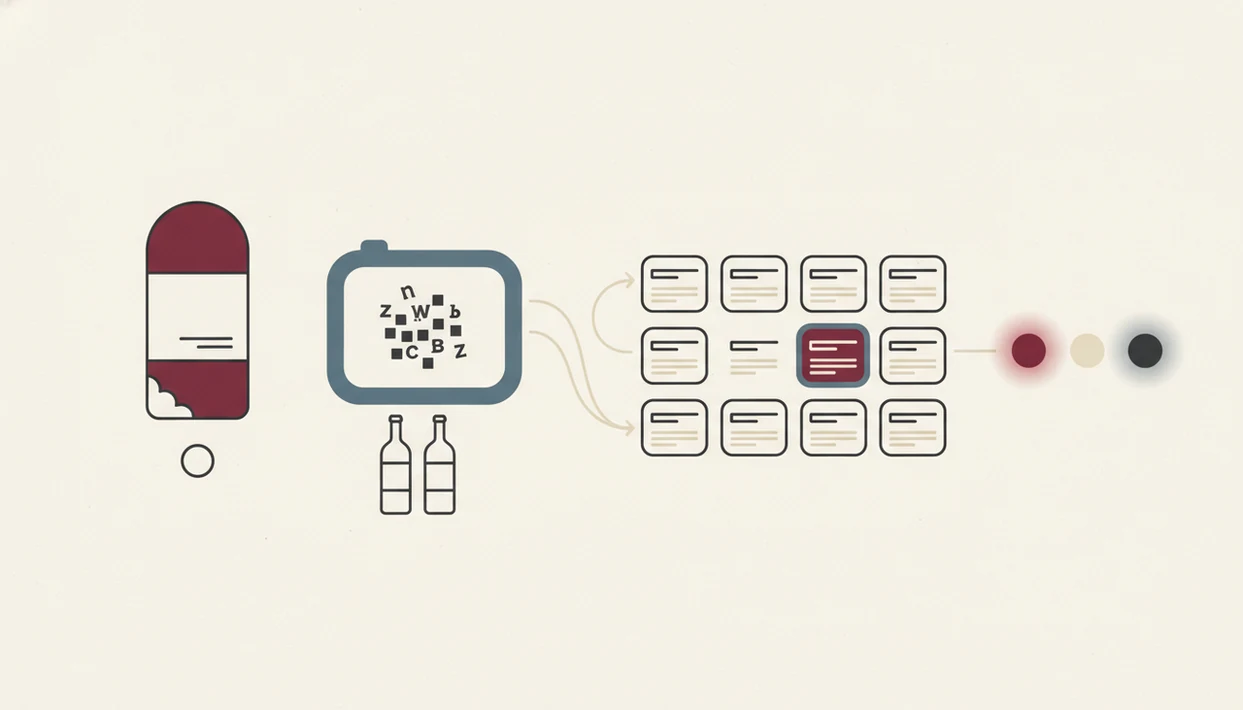
Wine scanner apps work by turning a photo into structured wine data. The usual path is photo capture, text extraction, image matching, database lookup, then a confidence score.
Image Recognition and OCR Pipeline
A label scan starts with computer vision and OCR. Computer vision compares shapes, logos, label layout, and image embeddings, which are compact mathematical fingerprints of the photo. OCR tries to read producer names, appellations, cuvée names, and vintage years.
Small details matter. I’ve turned a dusty Bordeaux label under a kitchen light just to catch the tiny appellation line near the bottom. A scanner has the same problem, only faster.
Database Lookup and Duplicate Merging
After reading the image, the app checks a wine database. Size helps, but clean structure helps more. Duplicate entries, merged vintages, and renamed bottlings can all bend the result.
Recommendation engines add another layer. They use collaborative filtering and flavor-profile modeling, similar to Netflix-style matching, to infer taste fit. Tools like Wine Identifier App combine computer vision with sommelier-level grape, region, and style models, but a model still needs clean input to be useful.
5 Facts About Wine Scanner App Accuracy
- Popular wines scan more reliably. Clear labels from widely sold bottles usually match faster than small-production wines, private labels, or older releases.
- Database hygiene matters as much as AI quality. A clever image model can still return the wrong bottle if the database has duplicate producers or muddled vintages.
- Ratings and match scores are probabilistic. They summarize user behavior and tasting patterns, not objective truth. If you like bright acidity with goat cheese, your history matters.
- Most errors have ordinary causes. Look-alike labels, re-brands, glare, smudged paper, and incomplete crowd data create many wrong results.
- Apps can model style, not taste the bottle. Apps like DiVino add sommelier logic, but they cannot detect whether the exact bottle in your glass is faded, corked, or heat damaged.
For casual buyers, a scanner is often more useful than guessing from the shelf talker because it can connect producer, region, grape, and typical style in one place.
Database Quality, 10 Million Wines, and Wine App Accuracy
Database quality is the quiet engine behind wine app accuracy. The app is not only asking, “Can I read this label?” It is asking, “Which clean record should this scan attach to?”
Major wine platforms have reported scale around 10 million wines, 1.5 billion label photos, and 200 million ratings. For example, Vivino has publicly reported large-scale wine, scan, and ratings data on its company pages; cite the current figures directly from the source before publishing: https://www.vivino.com/about. That volume gives algorithms more examples to compare. It also creates more cleanup work. One wine may have several barcodes, several vintage pages, and several user-created duplicates.
The case box marked with black marker is a good image for this problem. You may know it holds six bottles of the same wine, but the database may see six slightly different entries. As data volume grows and algorithms improve, accuracy usually improves too. Still, obscure producers and emerging regions produce less reliable results because fewer scans and ratings exist.
If photo storage worries you more than matching quality, the privacy side belongs in a separate wine app privacy review.
How We Source Wine Scanner Accuracy Claims
We treat wine scanner accuracy claims as evidence with scope, not as universal promises. A company’s database size can explain coverage, but it does not prove that every bottle scan, menu scan, vintage match, or pairing suggestion will be correct.
The cleanest reviews separate three things: company-reported database figures, independent OCR or computer-vision evidence, and hands-on results from real bottles. Lab tests can be useful because they isolate one task, such as text recognition or image classification. But a shelf or restaurant table adds glare, curved glass, torn paper, old vintages, and half-hidden producer names. That is why a high controlled-test result should not be read as a guarantee of real-world bottle-scan accuracy.
When checking a claim, use this order:
- Read the app’s own disclosures for database size, scan volume, ratings volume, and platform limits.
- Compare those claims with peer-reviewed OCR, image-recognition, or recommendation-system studies when they apply.
- Check official documentation or app-store notes for feature changes, regional availability, and Android-versus-iOS differences.
- Flag any number that is estimated, old, self-reported, or tied to one market, one device, or one scan type.
4 Myths About Wine Scanner Accuracy
Myth one: label recognition means the exact vintage, producer, and bottling are correct. In reality, many labels barely change from year to year, and line extensions can look nearly identical.
Myth two: app ratings are objective quality scores. They are user averages, shaped by who rated the wine, what they paid, and what styles are fashionable.
Myth three: AI can tell you how this specific bottle will taste. It can infer a typical profile, but it cannot smell wet cardboard, cooked fruit, or tired oxidation through a photo.
Myth four: more AI automatically means better recommendations. Better data, cleaner records, and clear taste signals matter just as much. AI wine tools should deliver bottle identification and style guidance, not certainty about a sealed bottle’s condition.
Short version: useful, not all-knowing.
If you want the recommendation side separated from scanning, read can AI wine recommendations be wrong.
Top Causes of Incorrect Wine Scanner Results
Incorrect wine scanner results usually come from visual ambiguity, database gaps, or missing vintage information. The app may be functioning correctly and still choose the wrong near-match.
Common failure points include look-alike labels, line extensions, multi-vintage bottlings, and re-branded wines. Low light, reflections, curved bottles, and a thumb over the appellation line make OCR worse. A restaurant bottle cradled in a napkin can hide exactly the text the scanner needs.
Crowd-sourced data adds another wrinkle. Popular bottles collect many ratings, while quiet regions may have thin or uneven entries. Vintage-less labels force the app to infer the year or return a general wine page.
How to use a wine scanner more accurately:
- Photograph the full front label with the producer, cuvée, region, and vintage visible.
- Reduce glare by tilting the bottle slightly away from direct light.
- Check the vintage manually before trusting price, cellar, or drinking-window advice.
- Compare the producer and region before accepting a match.
- Rescan the back label if the front label is decorative or sparse.
Limitations
Wine scanner apps have real limits, and the limits matter most when the bottle is expensive, old, or unfamiliar. Controlled AI wine-quality studies have reported classification accuracy around 80–95%, which still implies normal error rates of 5–20% under defined conditions. Because those results come from controlled classification settings, not live consumer label scans, they should be treated as directional evidence rather than a guarantee of wine scanner accuracy; add the exact study URL used for the 80–95% range here.
- They cannot detect cork taint, oxidation, heat damage, or poor storage from a label photo.
- Obscure producers, new labels, and emerging regions often have thinner database coverage.
- Low light, reflections, curved glass, and torn labels reduce visual recognition accuracy.
- Crowd-sourced ratings skew toward bottles that many users buy, scan, and review.
- Vintage matches can be wrong when labels look identical across years.
- Food pairings are inferred from grape, region, body, acidity, tannin, and dish cues.
- Even advanced apps like DiVino cannot guarantee taste matches or exact pairing success.
That last point is practical. Pair the sauce, not only the protein, and still taste before serving the whole table. If uploading bottle photos feels sensitive, the related question is is it safe to upload wine label photos.
When to Ask a Wine Professional Instead
Ask a wine professional when the decision has real money, service, or provenance attached to it. A scanner can narrow the field, but a sommelier, trusted merchant, or appraiser can judge context the app cannot see.
Use this order when the stakes are higher than a weeknight bottle:
- Consult a merchant or sommelier before opening, buying, or gifting an expensive, old, or collectible bottle. They can check producer history, fill level, capsule condition, and whether the vintage makes sense.
- Ask an appraiser before treating a scan result as resale evidence. Market value depends on provenance, storage records, bottle condition, auction demand, and verified identity, not just a matched label.
- Inspect the bottle closely when heat, seepage, cork movement, low ullage, or cellar neglect is possible. If the bottle will be served, taste or smell it before building a meal around the app’s profile.
- Treat pairings as guidance rather than a final service call. Apps can suggest structure and flavor matches, but the dish, sauce, guests, temperature, and glassware still matter at the table.
Read more
FAQ
Do wine scanner apps work in low light?
Low light reduces OCR accuracy and increases the chance of a wrong match. Use brighter indirect light and keep the full label in frame.
Can wine apps identify rare bottles?
Wine apps can identify some rare bottles, but obscure wines are less likely to have complete database records. Older labels and small-production cuvées are harder to match.
Are wine app ratings objective?
Wine app ratings are not objective quality measures. They are crowd-sourced user averages with selection bias toward popular and frequently scanned wines.
Do wine scanners detect corked wine?
No wine scanner can detect cork taint, oxidation, heat damage, or storage faults from a label photo. Those faults require smelling or tasting the wine.
How accurate are menu-scanning wine apps?
Menu-scanning apps rely on OCR text recognition rather than label images. Accuracy depends on font clarity, producer spelling, vintage visibility, and database matching.
Does vintage matter for scanner accuracy?
Yes, vintage matters because many wine labels look nearly identical across years. A scanner may identify the wine correctly but attach the wrong vintage.
Why does my wine app show wrong results?
Wrong results usually come from look-alike labels, poor photo quality, duplicate database entries, or missing wines. Check producer, region, cuvée, and vintage before saving.
Are food pairings from wine apps reliable?
Food pairings are useful shortcuts based on grape, region, structure, and typical flavor profile. They cannot fully account for recipe details or personal taste.
Are any wine scanner apps perfectly accurate?
No. Wine scanner apps can improve label matching with computer vision, OCR, and cleaner wine databases, but every result should still be checked against the producer, region, cuvée, and vintage on the bottle.