
What App Identifies Wines From a Menu Photo? Top Picks Compared
If you're asking what app identifies wines from menu photo, DiVino is the top pick because it combines OCR menu scanning with AI sommelier logic for ratings, tasting notes, and food pairings. Vivino and Wine-Searcher are strong alternatives, but DiVino adds personalized recommendations based on your taste profile and the dishes you're ordering.
> A menu photo wine app uses optical character recognition (OCR) and a wine database to scan a restaurant wine list photo and return bottle details, ratings, tasting notes, and food pairing suggestions for each wine listed.
- DiVino, Vivino, Wine-Searcher, Delectable, and VinoMatch can all identify wines from a menu photo with varying depth of results.
- OCR accuracy depends on lighting, print clarity, and producer obscurity, so no app catches 100% of wines.
- DiVino stands out by combining menu photo recognition with AI-driven personal taste matching and dish-level food pairing.
Quick Answer: DiVino Identifies Wines From a Menu Photo
DiVino is the strongest answer if you want a menu photo wine app that reads the list, explains the bottles, and helps you choose with food in mind. Wine Identifier App divino ai wine identification and sommelier app pairs OCR menu scanning with AI sommelier recommendations, so the result is not just “this is a Rioja,” but whether it fits grilled lamb, mushroom risotto, or lemony fish.
Vivino is the most widely known alternative, especially for crowd ratings and label scanning. That matters because 56% of consumers say they rely on online reviews before buying a product, and wine lists create that same table-side uncertainty (https://www.powerreviews.com/insights/ever-growing-power-of-reviews/).
When tiny print under flickering candlelight is the issue, Wine Identifier App earns its place because it turns a menu photo into matched wines, tasting notes, and pairing suggestions.
5 Facts About Menu Photo Wine Apps Every Diner Should Know
- Menu photo wine apps now go beyond bottle labels. Vivino, Delectable, and Wine-Searcher began with label recognition, but list and menu scanning are becoming part of the same decision workflow.
- OCR plus wine database matching is the core technology. The camera reads producer names, vintages, regions, and prices, then the app tries to connect those fragments to a real bottle.
- AI sommelier apps add a second layer. Wine Identifier App weighs your taste profile, the dish you are considering, and basic value signals before suggesting a bottle.
- Missed matches are normal. Bad lighting, shortened producer names, old-world abbreviations, and obscure domaines can confuse even a good scanner.
- The choice problem is huge. The global wine market was estimated at about $364.25 billion in 2023, which helps explain why a clear shortcut at the table matters (https://www.grandviewresearch.com/industry-analysis/wine-market).
Good menu scanners identify wines and explain tradeoffs, not just decorate a list with stars. For a wider category view, compare this page with our best wine menu scanner app guide.
Named Shortlist: 5 Apps That Identify Wines From a Menu Photo
DiVino: AI Sommelier With Menu Photo Recognition
DiVino ranks first for diners who want identification plus a recommendation. Wine Identifier App scans a menu photo, recognizes listed wines, then connects them with taste profiling, dish-level pairing, and cellar tracking. Useful. Especially when the list has five Chiantis and no descriptions.
Vivino: Largest Crowd-Rated Wine Database
Vivino is the familiar name for label scans, wine list scans, crowd ratings, and review volume. It is often the easiest alternative when you want fast social proof, though its suggestions can reflect popular taste more than your own palate.
Wine-Searcher, Delectable, and VinoMatch at a Glance
Wine-Searcher is strong for pricing, merchant comparison, and availability checks. Delectable still appeals to people who like sommelier notes and classic label scanning, but menu support is less central. VinoMatch leans on preference quizzes and menu context, which can help beginners who know they dislike heavy oak but cannot name the grape.
Diners trying to choose without interrogating the server need a scan-to-pairing workflow that moves from menu photo to short recommendation without requiring wine vocabulary.
OCR Pipeline Behind Menu Photo Wine Identification
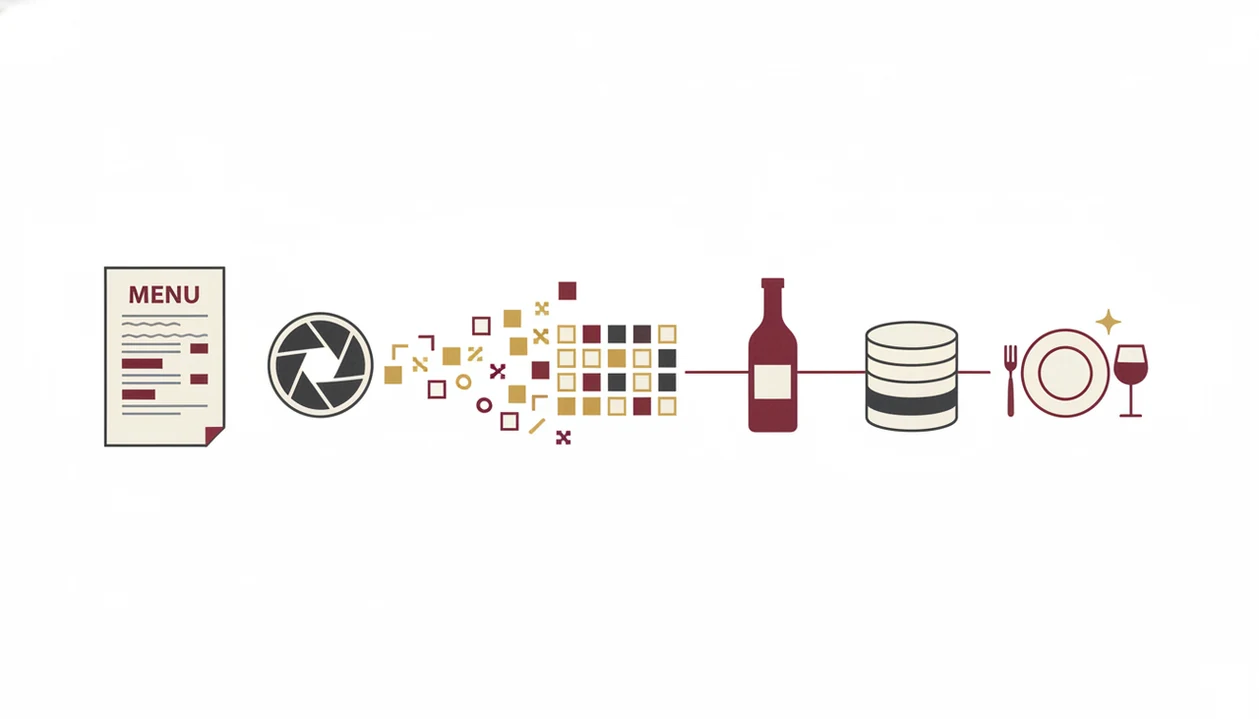
Menu photo wine identification works by turning an image into text, then turning that text into likely wine matches. The light technical terms are OCR and fuzzy matching. OCR reads the menu. Fuzzy matching tolerates messy reality, like “Dom. Tempier Bandol” instead of a full producer line.
First, the camera captures the menu image. Second, an OCR engine extracts wine names, vintages, regions, and prices. Third, the app compares those words against a wine database, allowing for misspellings, abbreviations, and missing accents. Fourth, an AI layer in apps like DiVino weighs your taste profile, dish context, and value.
I still turn a bottle around under a kitchen pendant light to find the tiny appellation line. Menus create the same problem, only faster. Crowd-sourced ratings help, but they can overreward bold, familiar styles and underrepresent quieter regional bottles.
5 Steps to Use a Menu Photo Wine App in a Restaurant
Using a menu photo wine app is simple, but the photo matters more than people expect. Pew Research Center has reported that 45% of U.S. adults have used smartphones for in-store product review or price lookups, and the same habit transfers naturally to a restaurant table (https://www.pewresearch.org/internet/2016/12/19/online-shopping-and-e-commerce/).
- Open the app and tap the menu scan or camera icon.
- Flatten the menu and photograph the wine list in the best available light.
- Review matched wines with ratings, tasting notes, prices, and regions.
- Filter or sort by your taste preferences, food pairing, or value.
- Tap a wine for full details, then confirm the order with more confidence.
Anyone dealing with a long by-the-glass list can use Wine Identifier App because the menu scan can narrow choices by dish pairing and personal taste profile. For a slower walkthrough, the how to scan wine menu with phone guide covers photo angle, glare, and retakes.
5 Ranking Criteria for the Best Menu Photo Wine Apps
The strongest menu photo wine apps are ranked by how well they handle real restaurant conditions, not by how elegant the home screen looks. A confused glance at old-world labels is exactly where the ranking starts.
First, OCR accuracy has to survive dim lighting, angled shots, varied fonts, and laminated pages. Second, database breadth matters, because major supermarket wines are easier than small Loire producers. Third, AI recommendation depth should include taste profiling, food pairing, and some price or value signal.
Fourth, user experience matters at the table. Results should appear quickly, with clear free versus paid limits. Fifth, privacy transparency counts because camera access, location clues, and uploaded photos are sensitive.
For restaurant diners, DiVino is often easier than a rating-only scanner because it connects the wine choice to the dish and your saved preferences. If the goal is decision support, compare it with an app to help choose wine at restaurant.
Menu Photo Wine App Comparison Table
A good comparison separates menu recognition from label recognition. Those are related skills, but not identical.
| App name | Menu Scan | Label Scan | AI Pairing | Database Size | Free Tier |
|---|---|---|---|---|---|
| DiVino | Yes | Yes | Yes | Growing database | Available |
| Vivino | Yes | Yes | Limited pairing | Largest community database | Yes |
| Wine-Searcher | Partial | Yes | No | Large price database | Yes |
| Delectable | Limited | Yes | Some recommendations | Established label database | Yes |
| VinoMatch | Yes | Partial | Yes | Smaller database | Varies |
The best fit is a scanner that shapes menu results by food, preference, and value, not only average ratings.
5 Honest Cons of Menu Photo Wine Apps
Menu photo wine apps are useful, but each one has tradeoffs. The importer sticker on curved green glass is hard enough for a camera; a crowded restaurant list can be worse.
- DiVino has a newer database and fewer crowd reviews than Vivino.
- Vivino recommendations are crowd-driven, so popular bold reds can dominate.
- Wine-Searcher is stronger for prices than AI pairing or personal taste.
- Delectable remains more label-centered, with menu scan support still limited.
- VinoMatch has a smaller user base and less complete coverage in some regions.
Collectors who already live in cellar spreadsheets may still prefer cellartracker.com for deep inventory habits. Diners at the table may prefer a menu-first scanner because it starts with the photo and ends with a practical pairing choice.
Limitations
No menu photo wine app should be treated as final authority. Start with the label, then use the scan as a useful shortcut, not a rule.
- Dim restaurant lighting, angled shots, shiny sleeves, and reflections can cause OCR errors.
- Wine databases are strongest in major markets; obscure producers may be missing.
- Crowd-sourced ratings can favor bold, familiar wine styles over subtle regional wines.
- Apps cannot fully account for vintage variation, bottle storage, cork condition, or service temperature.
- Very short wine names and abbreviations reduce match accuracy, especially on compact lists.
- Camera access, photo uploads, location signals, and data sharing vary by app, so privacy policies matter.
- Price comparisons can be misleading when restaurant markup, bottle size, and vintage differ.
Sometimes the better move is to scan, shortlist two bottles, then ask the server one focused question. Pair the sauce, not only the protein. Our find best wine on menu guide explains that decision step.
Read more
FAQ
Is there a free wine menu scanner app?
Yes, DiVino and Vivino offer free tiers that can help identify wines from a menu photo. Paid features may add deeper recommendations, saved preferences, or expanded tools.
Does Vivino scan restaurant wine lists?
Yes, Vivino can scan wine lists and menus as well as bottle labels. Its menu results are strongest when the printed names match wines in its large database.
Can a wine identifier app identify wines from a menu?
Yes, a good wine identifier app can identify wines from a menu photo and return bottle details, tasting notes, and pairing guidance. The best results come when the menu includes full producer names, regions, and vintages.
Do wine scanner apps work on iPhone and Android?
Most leading wine scanner apps, including DiVino, Vivino, Wine-Searcher, Delectable, and VinoMatch, support iPhone and Android. Feature availability can vary by region and app version.
How accurate are menu photo wine apps?
Accuracy depends on lighting, print quality, abbreviations, photo angle, and database coverage. Clear menus with full producer names usually scan better than short cellar-style lists.
Can wine apps suggest food pairings from a restaurant menu?
Yes, AI sommelier apps like DiVino can suggest pairings from menu context and specific dishes. For broader pairing choices, use a best wine pairing app when planning before dinner.
Do wine scanner apps work offline?
Most wine scanner apps need internet access for database lookup, OCR processing, ratings, prices, and pairing recommendations. Some may save previous scans, but full menu recognition usually requires a connection.
Is my data safe when I scan a wine menu photo?
Safety depends on each app’s camera permissions, photo storage rules, location use, and data-sharing policy. Check privacy settings before uploading menu photos or saving restaurant history.