
Wine App Data Deletion: How To Remove Photos, Cellar Data, And Your Account



Download App: wine app data deletion
A wine app data deletion request requires more than uninstalling the app from your phone, because you must separately request server-side removal of your account, label photos, tasting history, and cellar inventory through the app’s privacy settings. For Wine Identifier App users, navigate to Settings → Privacy & Data → Delete My Data and confirm with your password to initiate full account and data deletion.
Definition: Wine app data deletion is the process of permanently removing your account, personal profile, wine label scans, tasting notes, cellar inventory, and associated data from a wine app's servers; it is not the same as uninstalling the app from your device.
TL;DR
- Uninstalling a wine app does NOT delete your account or server-stored data
- Users can usually request deletion via Settings → Privacy & Data → Delete My Data
- Some data may persist in backups, legal records, or content already shared with other users
- Apple and Google both require apps to offer in-app account deletion paths
- Export any cellar data or tasting notes you want to keep before requesting deletion
What Wine App Data Deletion Covers
Wine app data deletion covers the account records and wine-specific activity a service stores about you, including your profile, scans, notes, ratings, and cellar entries. Removing the app icon from your phone only clears the local app, not the copy held on company servers.
A proper delete wine app data request should include your email address, username, password credentials, label photos, scan history, tasting notes, bottle ratings, and collection records. It may also cover restaurant menu scans, location-linked activity, and saved pairing preferences.
Start with the label, but end with the server.
If you once scanned a smudged cellar bottle fresh from the rack, that photo may live outside your camera roll. The same is true for a wine list scan or a note about cherry-skin bitterness in Sangiovese. For related storage risks, the wine app privacy guide explains what apps may collect before deletion begins.
Scope And Legal Disclaimer For Wine App Data Deletion
This guide explains the general mechanics of wine app data deletion, not legal advice. It can help you understand the usual paths and limits, but it cannot confirm what any individual company has erased from its systems.
The app’s own privacy policy, terms, and the laws that apply in your region control the actual result. A user in California, the EU, the UK, or another jurisdiction may have different rights, timelines, and exceptions. Support teams may also need to verify that you own the account before they act, especially if the request comes by email instead of through an authenticated in-app flow.
Use a cautious sequence when contacting support:
- Check the app’s privacy policy and deletion page before sending anything.
- Ask what information is required to verify the account.
- Provide only the minimum details needed, such as the account email or username.
- Avoid sending passports, payment cards, cellar invoices, or other sensitive documents unless the app gives you a secure upload channel.
- Save confirmation messages so you have a record of the request and response.
In-App Data Deletion Policy Guarantees
A wine app should offer an in-app deletion route for users who want to remove their account and associated wine data. The guarantee is practical: you can start the request inside the app, confirm identity, and ask for removal of personal wine records.
- In-app path: Go to Settings → Privacy & Data → Delete My Data.
- Password check: The app requires password confirmation before deletion starts.
- Apple compliance: Apple required account-creating apps to support in-app account deletion starting January 31, 2022, according to its developer notice source.
- Google Play compliance: Google Play also expects apps to provide data deletion information and may enforce violations.
- Retention limits: The service should remove account-linked wine data, but some legal, security, or backup records may remain for a limited period.
Wine-identification tools can help identify bottles, save tasting notes, and manage cellar records, not erase copies someone else already exported. Export anything you need before pressing delete.
How Wine App Data Deletion Works Behind The Scenes
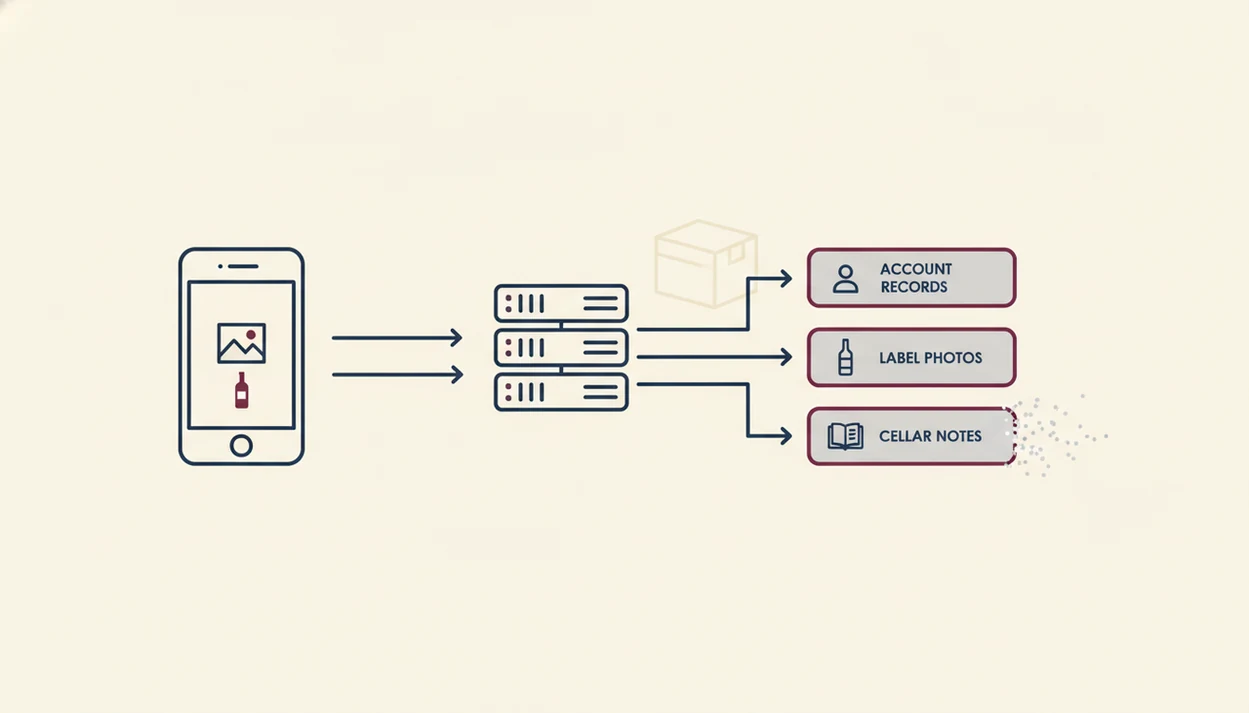
Wine app data deletion works by separating client-side removal from server-side database deletion. Client-side removal means the app disappears from your phone; server-side deletion means the service removes or disconnects your records from its production systems.
Most apps use queue-based deletion processing. In plain English, your request enters a waiting line, then background systems remove account records, label images, tasting notes, and cellar rows. CDN-cached label photos may need a separate purge, especially if scans were stored for quick display. Backup retention cycles can also delay final removal.
The cellar screen may look empty first.
There is also a difference between soft delete and hard delete. A soft delete deactivates the account or hides records. A hard delete permanently removes them from active databases. Legal holds, fraud prevention, tax records, and security logs may create exceptions. If you want to understand photo handling before deletion, read is it safe to upload wine label photos.
Wine App Account Deletion Exclusions
Wine app account deletion may not remove every copy of every item connected to your past activity. The clearest exclusions are content already shared with other users, reposted elsewhere, exported, screenshotted, or published on community pages.
If someone saved your tasting note from a shared bottle page, your account deletion may not reach that copy. Public comments or reviews can also follow separate moderation rules. Aggregated or anonymized analytics data may remain because it no longer identifies you as a named user.
That distinction matters.
A note about “soft tannins, better on day two” may feel personal when you wrote it at your counter. Yet once it is shared, the app may treat it differently from a private cellar entry. Backup copies can also persist during a limited retention window. Security, legal, or compliance records may be retained even after wine app account deletion is approved.
Apple And Google Requirements For Wine App Data Deletion
Apple and Google requirements are why modern wine apps usually provide clearer deletion controls than older apps did. Platform pressure benefits users because account deletion can no longer be hidden only in a support email thread.
Apple’s January 31, 2022 mandate required apps that allow account creation to let users initiate account deletion in the app. Apple described the change as a way to give users greater control over personal data. Google Play’s User Data policy requires developers to disclose account and data deletion options, and violations can lead to enforcement under Google Play policy source.
A mobile app privacy policy should also explain what information is collected, how long it is stored, and how users can request deletion. That matters for wine apps because scans can include photos, location context, and menu text. If location is your main concern, do wine apps store location data covers that issue directly.
How To Invoke Wine App Data Deletion Or Contact Support
To invoke wine app data deletion, use the in-app privacy path first, then contact support only if you cannot access the account or the deletion button fails. For most users, exporting cellar entries and tasting notes before deletion is the safest first move.
In-App Deletion Steps
- Open the app and go to Settings.
- Tap Privacy & Data.
- Select Delete My Data.
- Confirm with your password or required reauthentication.
- Export cellar data, tasting notes, and ratings before final confirmation.
- Check your email or account status later to verify completion.
Fallback: Requesting Deletion Through Support
If login access is lost, contact support with the email tied to the account and request wine app account deletion. Include enough information to verify ownership, but don’t send payment details or unnecessary identity documents unless support asks through a secure channel.
For collectors, exporting first is often better than screenshots because cellar rows preserve vintage, quantity, location, and drinking window in a usable format. Your wine-identification records should be treated like any other personal archive before deletion.
When To Escalate A Wine App Data Deletion Request
Escalate a wine app data deletion request when the normal in-app path and support channel stop working, especially after you have verified the account and saved proof of the request. Support is usually the first stop, but it is not always the last one.
Use escalation carefully and keep the record clean:
- Document the request by saving the date, account email, screenshots of the deletion screen, support ticket numbers, and any confirmation or refusal.
- Follow up once if the app ignores a verified request or gives only a vague answer without explaining timing, scope, or identity checks.
- Contact Apple or Google if the app was downloaded from their store and the promised in-app account deletion route is missing, broken, or hidden behind unusable steps.
- Contact a privacy regulator if your region gives you statutory deletion rights and the app still will not respond, explain retention, or process the request.
- Seek legal advice if the issue involves identity theft, a suspected data breach, someone else controlling the account, or a dispute over who owns the wine records.
Do not escalate by sending more sensitive documents into ordinary email. If proof of identity is necessary, ask for a secure channel first.
Limitations
Wine app data deletion reduces stored personal information, but it cannot guarantee instant erasure from every system, cache, backup, or outside copy. Treat deletion as a controlled process, not a magic switch.
- Deletion may not immediately remove records from every backup system or cached label image.
- Content already copied, screenshotted, exported, or reposted by other users may persist.
- Some apps require reauthentication, so deletion can fail if you no longer control the login.
- Store labels saying “data can be deleted” do not prove every record is fully erased.
- Public policy pages can change, so verify the current in-app deletion flow before acting.
- Anonymized or aggregated usage data may not be deletable if it no longer identifies you.
- Legal, fraud-prevention, or security holds may delay or prevent deletion of certain records. For users in the EU or UK, deletion rights may also depend on GDPR Article 17 and its exceptions for legal obligations, public interest, or legal claims source.
Look for the region before the romance, and look for the deletion scope before the promise. If scans and recommendations worry you more broadly, can AI wine recommendations be wrong explains another trust boundary.
Read more
FAQ
How long does wine app data deletion take?
Wine app data deletion may take time because apps often use processing queues, waiting periods, and backup retention cycles. The app should tell you if deletion is immediate or delayed.
Can I recover data after account deletion?
Permanent account deletion is typically irreversible once fully processed. Export cellar data, tasting notes, and ratings before confirming deletion.
Are my wine label photos deleted too?
Server-stored wine label photos and scan history should be included in a full deletion request. Photos saved only in your phone gallery must be deleted separately.
Does deletion remove shared tasting notes?
Deletion may remove private tasting notes from your account, but shared notes copied, saved, or reposted by other users may persist. Public community content may follow separate rules.
What if I can't log in to delete?
If you cannot log in, contact support from the email associated with the account and request deletion. Use support only after the in-app route is unavailable.
Is wine app data deletion required by law?
Apple and Google require account deletion paths for many apps distributed through their platforms. Privacy laws may also give users deletion rights depending on location and the data involved.