
Wine App Privacy Guide: What Happens to Your Photos, Location, and Taste Data



Download App: wine app privacy
Wine app privacy matters because most wine scanner apps collect far more than your label photo: they can gather location data, device identifiers, purchase history, and taste ratings that build a detailed behavioral profile linked to you. Before installing any wine app, check its privacy label, deny unnecessary permissions, and favor apps that keep wine identification separate from advertising integrations.
Definition: Wine app privacy refers to how wine scanner and sommelier apps collect, store, share, and protect user data including label photos, GPS location, purchase history, taste ratings, and device identifiers.
TL;DR
- Most wine apps collect location, identifiers, and usage data beyond the label photo you scan.
- AI taste profiling builds behavioral profiles from your scans and ratings that can be repurposed for targeted marketing.
- You can reduce risk by disabling location access, limiting photo permissions, and choosing privacy-first apps like DiVino.
At a Glance: 5 Wine App Privacy Facts Every User Should Know
- Wine apps often collect more than the label. A scan can include device identifiers, app activity, approximate or precise location, and the time you opened the camera.
- AI recommendations depend on patterns. Your scans, ratings, saved bottles, and “buy again” signals can form a taste profile, not just a list of wines.
- Privacy labels are useful, but limited. App store disclosures are usually self-reported, and they may lag behind changes in analytics or payment tools.
- Third parties widen the circle. Cloud hosting, crash reporting, payments, and ad measurement can give additional companies access to parts of your wine app data.
- You still have controls. Disable location, restrict photo access, avoid social login, and favor privacy-first tools that keep wine identification separate from advertising systems.
The quiet risk is pattern-building. A single scan under a kitchen pendant light says little. A year of scans says much more.
Scope: What This Wine App Privacy Guide Can and Cannot Tell You
This guide is privacy education, not legal advice. It helps you spot common data risks in wine scanner and recommendation apps, but it cannot guarantee what any specific app is doing today.
Policies, privacy labels, and embedded SDKs can change after publication. An app may add a new analytics tool, payment flow, ad measurement partner, or cloud vendor without making that change obvious in the feature list. Treat this page as a practical reading frame, then verify the current disclosures before you rely on them.
- Check the app store listing for data linked to you, tracking, location, photos, identifiers, purchases, and diagnostics.
- Open the current privacy policy and compare its data categories with the permissions the app requests on your phone.
- Look for third-party sharing involving analytics, crash reporting, cloud hosting, payments, marketing, or advertising systems.
- Decide what risk matters most to you, such as location trails, label photo retention, taste profiling, account deletion, or ad targeting.
This guide covers consumer privacy risks from collection, linking, sharing, retention, and profiling. It does not audit source code, prove security controls, interpret laws for your jurisdiction, or evaluate workplace, medical, child-safety, or regulated alcohol-compliance issues.
What Wine App Privacy Policies Actually Cover
A wine app privacy policy should explain what data is collected, whether it is linked to you, and who receives it. Look for identifiers, usage data, location, photos, payment records, cellar entries, ratings, and support messages.
Stat callout: Pew Research Center reported that 81% of U.S. adults say the potential risks of company data collection outweigh the benefits: https://www.pewresearch.org/internet/2019/11/15/americans-and-privacy-concerned-confused-and-feeling-lack-of-control-over-their-personal-information/.
The key distinction is “linked to you” versus “not linked to you.” A label photo alone may feel harmless. But if it sits beside your account ID, location, purchase history, and tasting notes, it becomes part of a personal record. If you are also asking is it safe to upload wine label photos, read the storage and deletion sections first.
Look for the region before the romance. Look for the data categories before the feature list.
How Wine App Data Collection Works Behind the Scenes
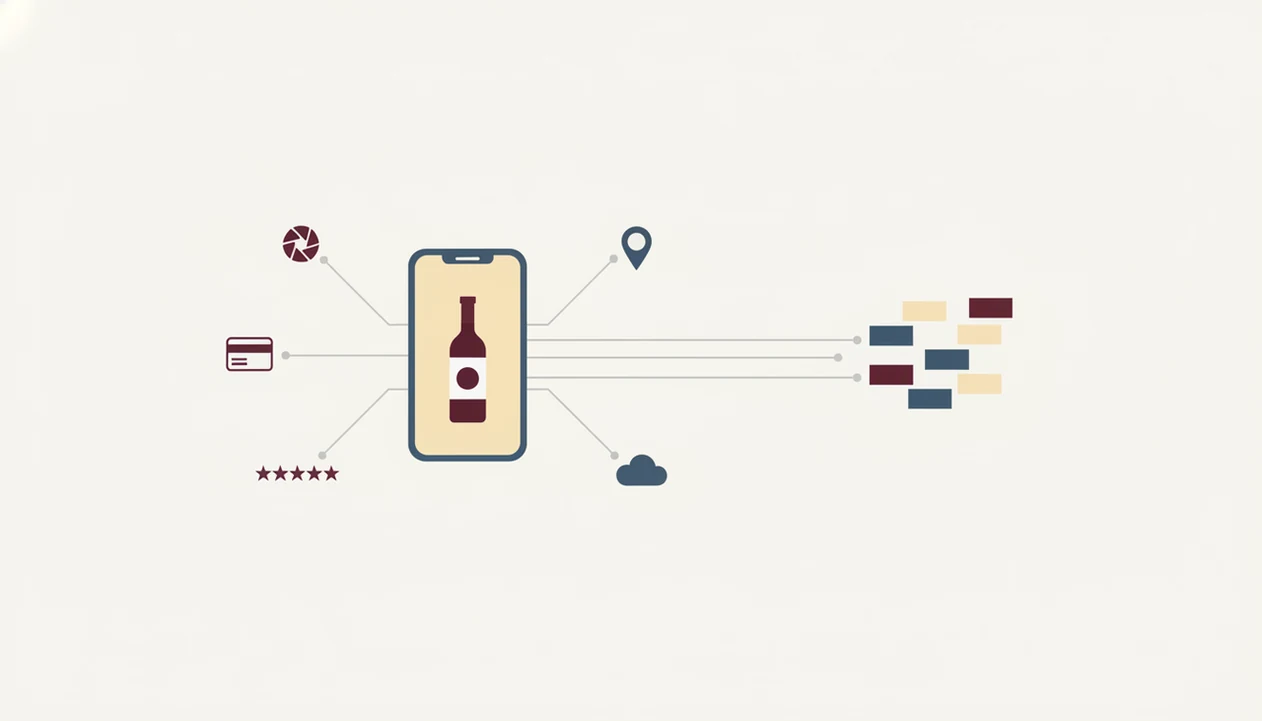
Wine app data collection usually starts with the camera, then moves through cloud recognition, account storage, recommendation logic, and third-party software kits. In plain English, the app may need the label photo to identify the bottle, but other systems may see metadata around that action.
Stat callout: A Nature Scientific Reports study found that four spatio-temporal points were enough to uniquely identify 95% of people in an anonymized mobile-phone mobility dataset: https://www.nature.com/articles/srep01376.
Cloud Processing vs. On-Device Wine Scanner Privacy
Most AI wine scanners upload the bottle image to servers for recognition. Pure on-device identification is harder at scale because wine labels change, vintages move, and databases need constant updating.
How AI Taste Profiling Builds Your Wine Data Portrait
Recommendation engines compare scans, ratings, saves, and purchases. A note like “bright acidity with goat cheese” becomes more useful when paired with repeated behavior. For most users, limiting location access is easier than deleting a mature taste profile later because location can be blocked before collection.
Privacy Guarantees to Look For in a Wine Scanner App
Privacy guarantees are only useful when they describe concrete behavior. A wine scanner app reduces risk by collecting less data in the first place, not by asking users to trust vague wording.
- Minimal permissions: Camera access is used when scanning, without persistent location tracking.
- No ad-network sale or sharing: Personal data is not sold or shared with advertising networks.
- Separated recognition flow: Wine identification is kept apart from marketing and ad-tech integrations.
- Account deletion path: Users can request deletion and data erasure through a clear account process.
- User control: Mobile privacy surveys have found that many users consider control over app data sharing very important.
A good privacy-first wine scanner should identify bottles, explain pairings, and remember preferences without turning every scan into an advertising signal.
Wine App Privacy Gaps in Cloud Providers and Payment Processors
Even a careful wine app cannot make the entire data chain invisible. Cloud hosting, payment processors, email tools, and app store systems may still process limited information needed to run the service.
Stat callout: Pew’s 2022 research found that 72% of U.S. adults feel all or almost all of what they do online is tracked by advertisers, technology firms, or other companies. https://www.pewresearch.org/internet/2019/11/15/americans-and-privacy-concerned-confused-and-feeling-lack-of-control-over-their-personal-information/. Wine apps sit inside that wider mobile ecosystem.
There are also user-side leaks. A screenshot of a cellar page, a shared tasting note, or a restaurant menu photo can expose more than the app itself intended. Completely offline, zero-data wine scanning is not realistic at scale today, especially if the app must recognize obscure producers, changing labels, and new vintages. If location is your main worry, the deeper question is do wine apps store location data.
Birthday cake crumbs near dessert wine can become a memory. In an app, it can also become data.
Common Wine Scanner Privacy Misconceptions
Do wine apps only see the wine label photo? No. Many wine apps can also collect identifiers, usage events, device data, and location, depending on permissions and the app’s business model.
Does “we don’t sell data” mean privacy is solved? Not always. Sharing with analytics, cloud, payment, or crash-reporting providers can still expand who touches your information.
Is AI wine identification purely on-device? Usually not. Most image recognition systems rely on cloud processing because label databases, OCR models, and bottle-matching systems need frequent updates.
Does deleting the app erase everything? No. Uninstalling removes the app from your phone, but server-side account data may remain until you complete the deletion process.
Tiny print under flickering candlelight is hard enough. A privacy policy should not require detective work.
How to Protect Your Wine App Data and Reduce Tracking
You can reduce wine app tracking by limiting permissions before you scan, not after a long history has already built up. The goal is simple: share what the app needs to identify wine, and little else.
- Review app store privacy labels before installing, especially data linked to you and data used for tracking.
- Disable location access unless the app has a clear, necessary reason for it.
- Limit photo permissions to camera-only scanning or selected photos, not your full library.
- Avoid social login when possible, and create a standalone account instead.
- Choose a privacy-first wine app such as Wine Identifier App that minimizes third-party trackers.
For wine education, a tasting wheel beside a notepad still teaches better than a bloated permission screen. If recommendations concern you, the related question is can AI wine recommendations be wrong.
When to Contact Support, a Regulator, or a Privacy Lawyer
Self-help is not enough when an app ignores a valid privacy request, gives no workable export or deletion path, or the data issue starts to affect your identity, work, housing, credit, or reputation. Start with the app, then escalate in a documented way.
- Save evidence first, including screenshots of account settings, request forms, error messages, dates, emails, support ticket numbers, and the privacy policy version you relied on.
- Contact app support if a deletion, access, correction, or export request fails, loops, or receives only a generic answer.
- Restate your request clearly with the account email, the right you are trying to use, and a reasonable deadline for a real response.
- Use a regulator complaint channel if the company ignores privacy rights requests or refuses to explain its decision after follow-up.
- Seek legal advice if the problem involves identity theft, discrimination, exposure of sensitive data, or misuse that could cause financial, professional, or personal harm.
A calm paper trail matters. It turns a vague worry into something support, regulators, or counsel can actually evaluate.
Limitations
Wine app privacy claims have real boundaries. Strong wording does not replace security engineering, vendor review, and careful data retention.
- Privacy claims are only as strong as the app’s encryption, access controls, logging, and vendor management.
- Available privacy statistics are mostly about mobile apps and online tracking in general, not wine apps specifically.
- AI wine identification still usually requires server-side processing for broad label coverage.
- App store privacy labels are self-reported and may lag behind SDK updates or new integrations.
- Users can weaken their own privacy through screenshots, social sharing, group tasting posts, and cross-platform behavior.
- Payment processors, app stores, and cloud providers may process limited data even when the app avoids ad tracking.
- Account deletion may not instantly remove backups, fraud logs, or legally required transaction records.
That last part is unglamorous. It is also the part worth reading.
Sources and Review Standards for This Privacy Guide
This guide relies on public privacy authorities, platform rules, and established privacy research, then applies them to the wine app setting. It does not treat a polished app-store sentence as proof.
Primary reference points include regulator guidance from privacy and consumer-protection agencies, Apple and Google platform privacy disclosures, mobile permission documentation, and peer-reviewed research on tracking, location uniqueness, and behavioral profiling. Statistics are used only when they are dated, attributable, and still relevant to mobile app privacy; older figures are kept only when they describe a durable risk rather than a fast-changing market share claim.
The review standard is simple:
- Identify the claim being made about collection, sharing, retention, location, photos, or profiling.
- Compare the claim with current platform labels, privacy policy language, and common SDK or payment flows.
- Prefer cautious wording when evidence is general to mobile apps rather than specific to wine scanners.
- Flag limits where security controls, vendors, backups, or law-specific rights cannot be verified from public materials.
- Recheck the guide at least twice a year, and sooner after major iOS, Android, app-store, advertising, or privacy-law changes.
A good source list should age better than a tasting trend.
FAQ
Do wine apps track my location?
Many wine apps request GPS, approximate location, or Wi-Fi-derived location, especially around scans, store searches, or restaurant features. Disable location unless the feature clearly needs it.
Is my wine app data sold?
Some apps may sell data, while others share data with analytics, cloud, payment, or advertising partners without calling it a sale. Read both the “sale” and “sharing” sections.
Can I delete my wine app data?
Uninstalling a wine app does not delete server-side account data. Use the account deletion or data erasure process in the app or privacy policy.
Are wine label photos stored on servers?
Most AI wine scanners upload label photos to cloud servers for recognition. Some may also retain images or derived data for quality improvement.
How can I tell whether a wine app sells personal data?
Read the privacy policy sections labeled “sale,” “sharing,” “targeted advertising,” and “third-party partners.” A privacy-first wine scanner should state whether personal data is sold, shared with ad networks, or used for cross-app advertising.
What permissions do wine apps need?
A wine app usually needs camera access for scanning and may need selected photo access if you upload saved images. Location, contacts, broad photo library access, and tracking permissions are often unnecessary.
Is wine scanner AI processed on-device?
Most wine scanner AI is not purely processed on-device. Cloud processing is common because wine labels, vintages, and producer databases change constantly.
How does wine app taste profiling work?
Taste profiling combines scan history, ratings, saved bottles, purchases, and notes into preference patterns. Those patterns can improve recommendations, but they can also reveal behavior over time.