
Is There an App That Tracks Wine Cellar Bottles?
Yes, an app that tracks wine cellar bottles lets you scan labels, log every bottle by vintage, location, and purchase price, and receive drink-window alerts so nothing gets forgotten on the rack. DiVino, CellarTracker, Vivino, and InVintory take different approaches to cellar records, but AI-powered cellar tracking apps can auto-fill wine details from a photo, store tasting notes, and suggest food pairings, turning your phone into a full-service cellar manager.
> A cellar tracking app is a mobile or web tool that inventories every wine bottle you own by producer, vintage, storage location, drinking window, and tasting notes so you can manage, find, and enjoy your collection without spreadsheets.
- Modern cellar tracking apps use AI label scanning to auto-fill bottle details in seconds.
- Essential fields include vintage, storage location, purchase price, drinking window, and tasting notes.
- Consistent logging when bottles are added, moved, or opened is the only way to keep your digital cellar accurate.
What a Cellar Tracking App Actually Does
A cellar tracking app is more than a digital spreadsheet; it connects bottle identity, storage location, tasting history, and drinking timing in one searchable record. The point is simple: know what you own, where it sits, and when it is worth opening.
A good app starts with the label, then builds the record around producer, vintage, region, grape, bottle size, price, and rack position. Modern tools may also add AI label recognition, community reviews, pairing suggestions, and drinking-window estimates. That matters whether you have twelve bottles in a closet or a case box marked with black marker under the stairs.
Cellar tracking is not only for collectors with museum-sized rooms. In a 2021 Gallup survey, 32% of U.S. adults reported drinking wine (https://news.gallup.com/poll/353858/alcohol-drinking-habits-hold-steady.aspx), which gives wine-related digital tools a broad audience. For a smaller collection, the app prevents the same problem: buying another Pinot Noir while the good one is already hidden behind the Syrah.
Five Essential Facts About Tracking Wine Bottles
- Bottle identity must be complete. Producer, wine name, varietal, vintage, region, quantity, bottle size, location, and purchase details are the fields that make a bottle findable later.
- Scanning reduces the dull work. A label scanner plus a wine database can auto-fill most of the record, which is far easier than typing a long appellation under a kitchen pendant light.
- Aging fields guide real decisions. Drinking window, style, and score help separate “open with dinner” bottles from ones that should rest another year.
- Notes turn inventory into learning. Tasting notes, food pairings, and AI recommendations help you remember what you are actually tasting, such as cherry-skin bitterness in Sangiovese rather than “dry red.”
- Accuracy still depends on habits. The app cannot know that you opened the second bottle after the guests arrived. You have to update every add, move, and open.
For most home collectors, a wine inventory app becomes useful only when it records both the wine and the exact place the wine lives.
How a Wine Cellar Tracking App Works
A wine cellar tracking app works by turning a bottle into structured data: capture the label, match it to a wine database, then save that match inside your personal inventory. The record usually connects identity, location, purchase history, tasting notes, and drinking-window guidance.
AI Label Recognition and Database Matching
The scan begins with image capture. AI label recognition reads visible text and design features, then compares them with database entries. In plain terms, the app tries to answer: “Is this the 2018 village Burgundy, the 2019 regional Burgundy, or something else?” Community and professional review data may then help estimate scores, style, and drinking windows.
Multi-Location Cellar Maps
A structured data model links each bottle to a location hierarchy, such as home cellar, rack, shelf, row, and slot. It can also separate off-site storage or restaurant lockers. A 2019 Wine Economics study of U.S. collectors found that 80% stored part of their collection off-site, so multi-location tracking is not a luxury feature. Global smartphone ownership reached 76% in advanced economies in 2018, which explains why mobile-first cellar tools feel natural now.
How to Use DiVino to Track Wine Cellar Bottles
You use a cellar tracking app well by logging each bottle at the moment it enters or leaves storage. Tools like Wine Identifier App make that faster by combining scan, inventory, tasting notes, and pairing guidance in one phone workflow.
- Create a profile with your taste preferences, such as bright acidity, soft tannins, or richer oak spice.
- Scan the label or menu entry to auto-fill producer, vintage, region, grape, and style details.
- Set storage location, rack position, and quantity before the bottle disappears into a mixed shelf.
- Add purchase price, tasting notes, and personal rating while the context is still fresh.
- Review drink-window alerts and food pairing suggestions before opening, especially for bottles you planned to age.
- Mark bottles as consumed so your app count matches the rack count.
In a 2022 survey, 46% of U.S. adults said they used smartphones to research products in-store. That habit fits wine shelves neatly, especially when an importer sticker wraps around curved green glass.
Fields That Matter Most When You Track Wine Bottles
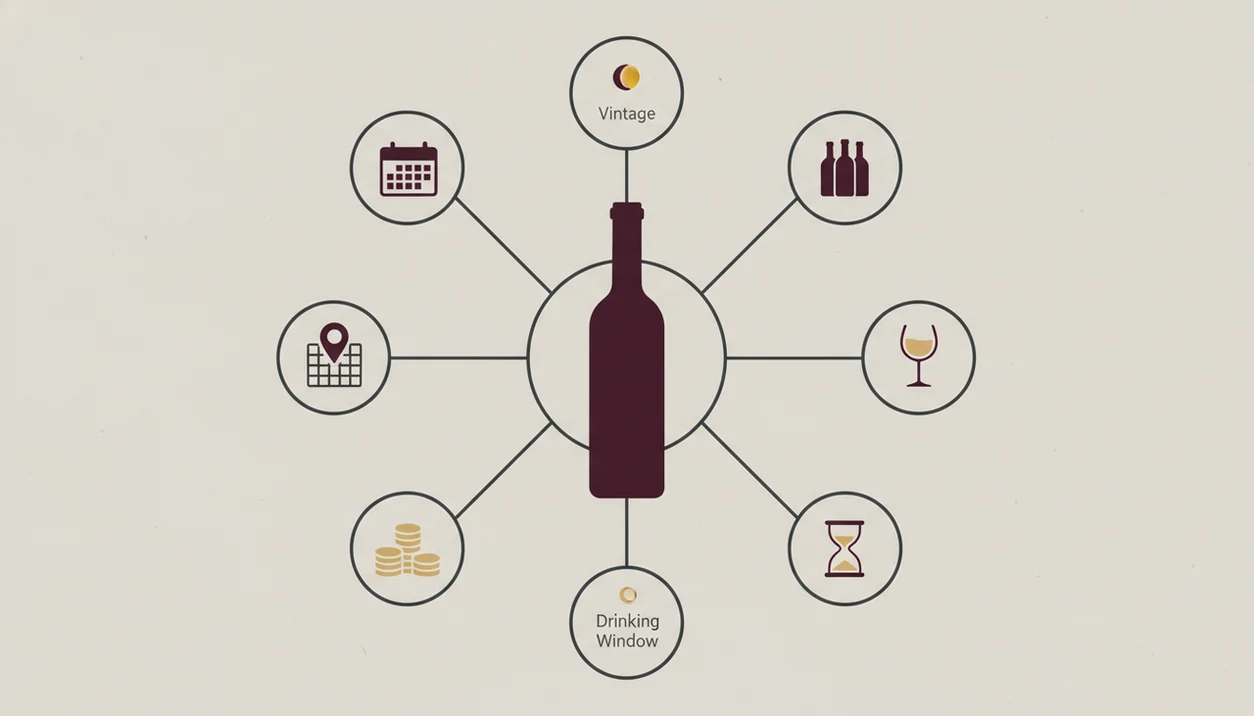
Useful cellar tracking depends on four field groups: identity, logistics, value, and experience. Many “top app” lists skip this breakdown, but these fields decide whether your record helps you find a bottle or just admire a database.
Identity and Logistics Fields
Tier 1 is identity: producer, wine name, varietal or blend, vintage, and region. Look for the region before the romance, because “Rioja” answers a different question than “Tempranillo.” Tier 2 is logistics: quantity, bottle size, storage location, and bin or rack position.
Value and Experience Fields
Tier 3 is value: purchase price, current market value, purchase date, and provenance. Tier 4 is experience: drinking window, tasting notes, food pairings, and personal score. If you want deeper drinking-window logic, a wine drinking window app should connect age, style, and your own notes, not just show a generic year range.
For everyday collectors, location fields are often more useful than scores because they solve the immediate problem: finding the bottle before dinner gets cold.
Requirements Before You Start a Cellar Tracking App
Before you start, you need a working phone camera, a rough physical inventory, and a clear naming system for storage locations. “Closet shelf two” is better than “miscellaneous,” even if it feels plain.
Make one pass through your bottles first. Count them, group them by place, and decide what each rack, shelf, box, or off-site locker will be called. Then commit to logging every incoming and outgoing bottle. That is the quiet discipline behind clean data.
A 2023 Statista report estimated global digital health and wellness app adoption above 400 million users, showing that people are comfortable tracking lifestyle data on phones. Wine is a narrower use case, but the habit is familiar. Scan, save, review, repeat.
Common Mistakes With Cellar Tracking Apps
The most common cellar tracking mistake is forgetting to mark a bottle as consumed. After a few dinners, the app says you own six bottles, but the rack says four. The rack is right.
Another mistake is assuming the label scan also records the location. It does not. The scan identifies the wine; you still set the rack, bin, shelf, locker, or box by hand. Rare wines, older vintages, and custom bottlings also deserve manual checking, especially when the label is torn or faded.
AI sommelier tools can support decisions, not replace judgment. Good divino ai wine identification and sommelier app workflows deliver label recognition, cellar structure, pairing cues, and drink timing, not rare-wine authentication or a guaranteed cellar strategy. If you never review alerts, even a tool that can alert ready to drink wine becomes background noise.
How to Verify Your Digital Cellar Matches Reality
Verify your digital cellar by spot-checking one rack, shelf, or box every quarter against the app. Do not audit the whole collection unless you enjoy turning a Saturday into inventory day.
Start with the total bottle count in the app, then compare it with a physical count. Next, inspect one defined area and flag missing bottles, wrong locations, duplicate entries, and outdated quantities. Small errors spread.
Use filters to surface bottles past their drinking window or bottles with no assigned location. Those are the messy records. A special-occasion magnum on the top shelf should not be filed under “unknown,” because that is how expensive bottles become invisible.
For most collectors, quarterly spot-checks are more realistic than annual full audits because errors get caught while the memory of recent openings is still fresh.
Limitations
Cellar tracking apps are useful, but they do not remove the need for careful habits and human judgment. The software can organize what you enter; it cannot correct what you forget.
- Data accuracy depends entirely on user discipline. No app self-corrects a missed dinner bottle.
- AI label recognition can struggle with older vintages, obscure producers, damaged labels, and custom bottlings.
- Most apps use proprietary databases, so exporting your complete cellar to another platform may be limited or impossible.
- Location tracking is manual. No phone app automatically knows which rack or bin holds the bottle.
- Community scores and drinking windows are crowd-sourced estimates, not promises.
- Free tiers often limit bottle count or turn off advanced tools like drink-window alerts.
- No app fully replaces a human sommelier for complex cellar planning, rare-wine authentication, or auction decisions.
A practical app helps you decide faster, but it should not make the decision feel automatic.
Read more
FAQ
Can I scan wine labels to add bottles?
Yes, many modern cellar tracking apps let you scan a wine label and auto-fill producer, vintage, region, grape, and style details. You still need to confirm the match and set the storage location manually.
Is there a free cellar tracking app?
Yes, some cellar tracking apps offer free tiers. Free plans often limit bottle count, exports, advanced alerts, or valuation features.
Can a cellar tracking app track drinking windows?
Wine Identifier App can help track drinking windows by attaching drink timing guidance to saved bottles. Users should still treat alerts as estimates, especially for rare wines or unusual storage conditions.
Can I track bottles in multiple locations?
Yes, many cellar tracking apps support multiple locations, including home racks, closets, off-site storage, and restaurant lockers. The key is naming each location clearly before you enter bottles.
How accurate is AI label recognition?
AI label recognition is usually strongest on clean, modern labels from well-documented producers. It is less reliable with damaged labels, older vintages, obscure estates, and bottles with heavy condensation.
Do cellar apps suggest food pairings?
Yes, many cellar apps suggest food pairings from wine style, grape, acidity, tannin, and sweetness. Wine Identifier App can pair bottles with dishes, but sauce and preparation still matter.
Can I export my cellar data?
Some cellar apps allow CSV or spreadsheet exports, but others restrict exports or omit certain fields. Check export options before entering a large collection.
How many bottles can I track in a cellar app?
Bottle limits vary by app and pricing tier. Some free tiers handle dozens of bottles, while paid cellar tracking tools may support hundreds or thousands.