
A wine cellar app is a mobile tool that uses AI image recognition to scan wine labels, log bottles into a searchable digital inventory, and deliver personalized sommelier recommendations based on your taste history.
- DiVino lets you scan any wine label to instantly add bottles to your cellar inventory with full details.
- Cloud sync keeps your wine inventory backed up and accessible on every device.
- AI-driven recommendations and food pairings act as a pocket sommelier.
- Available as a free download on iOS and Android with optional premium features.
- Structured fields for vintage, region, grape, cellar location, and drink-by dates.
What a Wine Cellar App Download Gives You at a Glance
A wine cellar app download should turn loose bottles into a usable inventory, not just a prettier list. Wine Identifier App gives you label scanning, structured cellar fields, pairing help, and reminders in one phone-first workflow.
- AI label scanning: Point your camera at the front label, and the scan fills in producer, wine name, vintage, region, and grape when available.
- Inventory fields: Each bottle can carry vintage, region, grape, purchase price, cellar location, drink-by date, and personal rating.
- Cloud backup: Your cellar moves with you across iPhone, Android, and tablet use, instead of living in one spreadsheet.
- Drinking context: Pairing suggestions and drinking window alerts help you decide what to open before a bottle fades.
- Free start: The free tier covers core scanning and cellar logging, with premium options for heavier use.
Casual buyers who keep twelve bottles under the stairs need the cellar app because the scan-to-cellar flow prevents mystery bottles from becoming forgotten gifts.
How AI Wine Inventory Tracking Works Inside DiVino
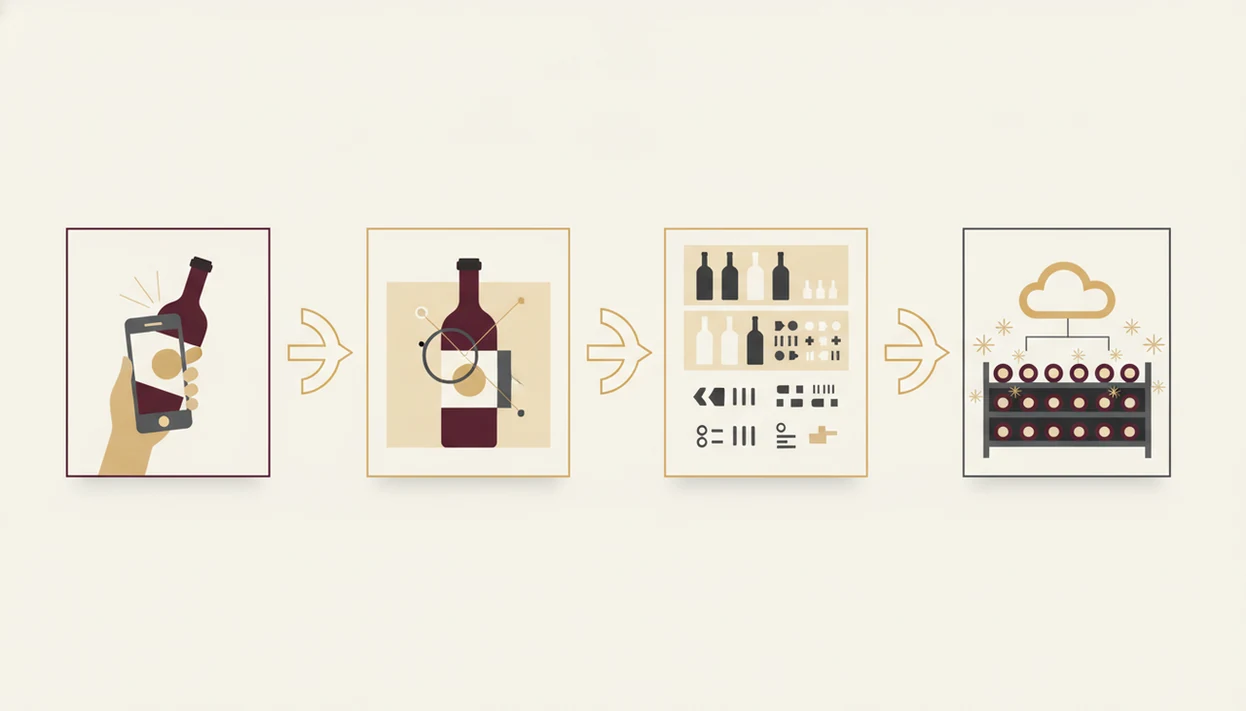
AI wine inventory tracking works by turning a bottle image into structured wine data, then connecting that data to your cellar record and taste history. DiVino uses image recognition, text extraction, database matching, and preference modeling to make the bottle searchable after the scan.
AI Label Recognition Pipeline
The camera captures the label, then an AI model reads text and visual features such as producer names, label layout, vintage placement, and appellation wording. Those features are compared against a wine database. In plain English, the phone looks for the same clues I look for when I turn a bottle under a kitchen pendant light to find the tiny appellation line.
In general image-recognition systems, larger and more varied training datasets tend to improve matching accuracy, but DiVino's exact training corpus is not publicly disclosed source. Damaged paper still causes trouble.
Personalized Taste Modeling
Wine Identifier App divino ai wine identification and sommelier app learns from ratings, saved bottles, scans, and tasting notes. If you keep liking lemon-zest acidity with goat cheese, recommendations should gradually lean brighter and fresher.
Your scan can be processed locally first, then uploaded in encrypted form for cloud sync. Preference data may be anonymized to improve matching without tying every pattern back to your name.
How to Download and Set Up the DiVino Wine Cellar App
To set up DiVino, download it, create an account, scan one bottle, and add the cellar details before you scan the rest. Start small; your first clean record teaches you the rhythm.
- Download DiVino from the iOS App Store or Google Play and open the free account flow.
- Create a free account and enable cloud sync so your inventory is backed up across devices.
- Scan your first bottle label with the camera, keeping glare away from the producer name and vintage.
- Assign cellar location by rack, row, shelf, box, or fridge slot, then add drinking window and notes.
- Review your inventory dashboard and set drink-by alerts for bottles you do not want to miss.
- Explore AI pairing and recommendations after you have logged a few bottles and ratings.
For collectors who need a cellar app download without rebuilding a spreadsheet, the inventory workflow fits because the first scan creates both the bottle profile and the inventory record.
If you want a deeper inventory-only explainer, the wine inventory app guide breaks down fields, filters, and bottle tracking in more detail.
Wine Cellar App Features for iPhone and Android
A good cellar app should feel native on your phone while keeping the core cellar record identical across platforms. According to Pew Research, 81% of U.S. adults used smartphones in 2020, which makes mobile-first wine inventory the normal path for most households source.
DiVino Cellar App on iOS
On iPhone, DiVino can support Siri shortcuts, Apple Watch quick-add, and an iCloud backup option alongside account sync. That matters when you are adding a bottle with one hand while the restaurant bottle is cradled in a napkin.
DiVino Cellar App on Android
Android users get home screen widget access, Google Assistant integration, and the same scan, inventory, and pairing engine.
| Feature | iPhone | Android |
|---|---|---|
| AI label scanning | Yes | Yes |
| Vintage, grape, region fields | Yes | Yes |
| Siri or Google Assistant support | Siri | Google Assistant |
| Watch or widget quick-add | Apple Watch | Home screen widget |
| Pairing engine | Yes | Yes |
Minimum Requirements for Wine Inventory Download
Before you start a wine inventory download, check your phone, camera, storage, and internet access. Most users will be fine with a recent device, but older phones can struggle with label focus and larger cellar searches.
DiVino is designed for iOS 15 or later and Android 10 or later. Keep at least 250 MB free for the app, plus extra room for cached label images and offline records. A 12 MP camera or better gives cleaner scans, especially on glossy labels or tiny vintage years above the barcode.
Initial setup needs internet access for account creation, database matching, and cloud sync. Offline scanning can save a draft record, but full identification, backup, and recommendation updates work better when connected.
For people comparing cellar-first tools, our best wine cellar app guide explains which features matter before you move a collection.
DiVino Cellar App vs CellarTracker and Other Wine Apps
DiVino is strongest when you want AI scanning, cellar fields, food pairing, and taste-based recommendations in the same daily workflow. CellarTracker is stronger when you want deep community tasting notes and a long-established collector database.
Where DiVino Outperforms CellarTracker
Wine Identifier App focuses on scan-first entry, structured cellar fields, and AI personalization. Good divino ai wine identification and sommelier app choices deliver label recognition, inventory, and pairing guidance, not a wall of unexplained scores.
Where CellarTracker Has an Edge
CellarTracker has years of community review depth, especially for collectors who trust crowd notes. For a fair check, compare current feature lists directly on CellarTracker, InVintory, Vivino, and each app-store listing before importing a large cellar. Export options, scan limits, and subscription gates can change faster than review pages. InVintory leans into visual cellar mapping, while Wine Identifier App uses rack, row, shelf, vintage, and drinking-window fields.
| App | Main strength | Free tier | Personalization | Export flexibility |
|---|---|---|---|---|
| DiVino | AI scan, cellar tracking, pairings | Core scan and logging | Taste model from ratings and scans | Planned or limited by format |
| CellarTracker | Community reviews | Broad database access | Mostly user and community driven | Stronger collector workflows |
| InVintory | Visual cellar layout | Varies by plan | Cellar organization focus | Varies |
| Vivino | Ratings and marketplace discovery | Strong scan discovery | Rating-based suggestions | Less cellar-first |
If your priority is remembering what you own before buying another similar bottle, Wine Identifier App earns the spot because its dashboard connects purchase, location, and drink-by timing.
Wine Cellar App Workflow: From Store Shelf to Drinking Window
A cellar app works best when you use it at every bottle handoff: purchase, storage, opening, tasting, and removal. That lifecycle is where Wine Identifier App becomes more useful than a note on your phone.
Start with the label at the store shelf or restaurant table. Scan before you buy, then check grape, region, vintage, and price. After purchase, assign rack, row, shelf, or fridge location before the receipt disappears under a tasting notebook. Set a drinking window if the bottle is age-worthy, especially for reds with firm structure or whites built on bright acidity.
When a bottle is ready, use the AI pairing suggestion against the actual dish. Pair the sauce, not only the protein. A tomato-braised pork shoulder wants different acidity than roast pork with apples.
Per the CDC, nearly half of U.S. drinkers reported drinking wine in the past month in 2023 source. For regular wine drinkers, a cellar workflow is often easier than memory because bottles move faster than notes get written.
The inventory workflow also keeps tasting notes attached to the bottle, so cherry-skin bitterness in Sangiovese is not lost after dinner.
For alert-heavy collections, the wine drinking window app guide explains drink-by dates and maturity reminders.
Download DiVino Wine Cellar App Free Today
Download DiVino from the iOS App Store or Google Play to start scanning and logging bottles for free. The free tier includes core label scanning, cellar entry, basic inventory fields, tasting notes, and pairing discovery, with optional premium features for larger collections or advanced analytics.
Scan, track, pair, then drink smarter. Not louder. Not showier.
On days the seafood menu sits beside chilled white wine, the cellar app helps because the menu scanner and pairing engine can narrow choices before the server returns. You can scan your first bottle within about 60 seconds of installation if the label is clean and your account is ready.
If you mainly need removal logs and quantity checks, the app to help track wine bottles article covers that practical workflow.
Limitations
Wine cellar apps are useful, but they are not flawless. DiVino still depends on clean inputs, current databases, and consistent user habits.
- AI label scanning can misread damaged labels, smudged back labels, vintage changes, or obscure producers.
- No app replaces a human sommelier for tasting new vintages, tiny allocations, or emerging regions with little data.
- Inventory accuracy depends on scanning every purchase and marking every opened or gifted bottle as removed.
- Advanced features such as unlimited scans, cloud backup depth, valuation tools, or pro analytics may require a subscription.
- Cross-platform export may be limited by format, which can make switching to cellartracker.com or another system slower later.
- Offline mode usually has reduced matching, recommendation, and sync capability compared with connected use.
- Very large collections above 1,000 bottles may search more slowly on older phones.
- Restaurant lists with tiny print under flickering candlelight can still defeat a camera scan.
For serious collectors, the cellar app is a useful shortcut, not a rule, because cellar discipline still comes from consistent logging.