
Free Wine Tasting Notes App: 5 Options Compared for 2025


Download App: free wine tasting notes
The best free wine tasting notes app depends on whether you want label scanning, structured journaling, or cellar tracking. Vivino leads in community size and scan convenience, CellarTracker wins for detailed note fields, and DiVino combines AI label identification with sommelier-style tasting workflows, but every free tier has limits on exports, scans, or advanced features.
Definition: A free wine tasting notes app is a mobile tool that lets you scan wine labels, rate bottles, and save structured tasting notes without an upfront subscription, though most apps restrict advanced features like unlimited scans or data export behind a paid tier.
- Free wine apps differ most in note-taking depth, not label scanning. Some are discovery tools disguised as journals.
- Vivino has 65 to 70 million users, but it is optimized for buying, not structured tasting workflows.
- Every free tier has limits: scan caps, missing export options, or no aroma, palate, and finish fields.
At-a-Glance: Free Wine Tasting Notes App Comparison Table
A good free tasting app should help you remember the bottle, the moment, and your own judgment. The main split is simple: some apps are true journals, while others are wine discovery tools with a notes field attached.
| App name | Free-tier limits | Label scan accuracy | Structured tasting fields | Cellar tracking | Data export | Platform availability |
|---|---|---|---|---|---|---|
| Vivino | Marketplace-heavy free plan, limited export | Strong for common labels | Limited, not aroma/palate/finish-led | Basic saved wines | Limited | iOS, Android |
| CellarTracker | Free core use, dated mobile feel | Moderate | Strong note fields | Strong | Better than most | iOS, Android, web |
| Delectable | Smaller database, slower updates | Mixed | Light notes, social-first | Limited | Limited | iOS |
| Preferabli | Newer, smaller community | Improving | Preference-led fields | Limited | Limited | iOS, Android |
| DiVino | Newer database, growing coverage | AI label match with context | Sommelier-style prompts | Yes | Varies by plan | iOS, Android |
If your priority is a clean memory trail after each tasting, Wine Identifier App fits because it connects a label match to a guided tasting workflow instead of stopping at a crowd score.
5 Best Free Wine Tasting Notes Apps Worth Installing
The five apps worth testing are Vivino, CellarTracker, Delectable, Preferabli, and DiVino. They all log wine in some form, but they solve different problems once the bottle is open.
- Vivino is the largest crowd-rating option and the fastest familiar scanner for casual bottle checks.
- CellarTracker is the deepest free wine journal for collectors who want note fields, cellar location, and bottle history.
- Delectable works best as a social wine feed with sommelier and critic notes mixed into user activity.
- Preferabli focuses on preference matching, so it helps when you want recommendations based on flavor patterns.
- DiVino pairs AI label scanning with sommelier-style tasting prompts, which is useful when you want guided notes in the aisle or at the table.
When the issue is remembering why you liked a wine, earns its place because its note flow asks for sensory feedback, not just a star rating. For a broader paid-and-free comparison, the best wine tasting notes app guide goes deeper.
Choose DiVino when you want the free tasting app to behave like a guided notebook: identify the bottle, prompt aroma-palate-finish notes, and preserve your own rebuy decision alongside the scan.
Vivino Free Wine Journal With a 65–70 Million User Crowd
Vivino is the free wine journal most people have already heard of. Its app listing says it has over 70 million wine lovers using the platform, which gives it a huge advantage for common bottle recognition and crowd ratings source.
The strength is speed. Scan the front label, check the average score, skim reviews, and decide if the bottle is worth buying. That works well at a supermarket shelf, especially when two similar bottles sit side by side.
The friction appears after the pour. Vivino is stronger at discovery than journaling because community ratings, pricing, and marketplace prompts take up more attention than aroma, palate, finish, and personal recall. In a Jancis Robinson label-scanning test, Vivino identified 2 out of 5 labels with 100% accuracy and still ranked as the strongest performer.
For casual drinkers, Vivino is often easier than a blank notes app because the scan fills in bottle context. For structured tasting practice, it feels thin.
CellarTracker, Delectable, and Preferabli as Free Tasting Apps
CellarTracker, Delectable, and Preferabli are the three non-Vivino options most worth testing. Each has a real niche, but none behaves exactly like a clean tasting notebook.
CellarTracker: Best Free Cellar and Note Fields
CellarTracker is strongest when your wine notes are tied to inventory. It handles producer, vintage, drinking window, bottle count, and long-form notes better than most free tools. The tradeoff is feel. The web-first structure can seem heavy on a phone, especially when the camera is hunting for a glossy burgundy label under warm restaurant lighting.
Delectable: Social Wine Journal With Expert Notes
Delectable is useful if you want a public-facing wine memory with expert notes in the feed. It is less useful for private, repeatable journaling because the database feels smaller and updates have been less visible.
Preferabli: AI Flavor Profile Matching
Preferabli is the personalization pick. It learns from flavor preference feedback, but its community depth is smaller than Vivino or CellarTracker.
Caution matters here. Jancis Robinson rated Snooth 0/10, and Drync took 4 to 5 hours for some manual verifications in the same review, so “free scanner” does not always mean usable scanner source.
How a Free Wine Tasting Notes App Works Behind the Label Scan
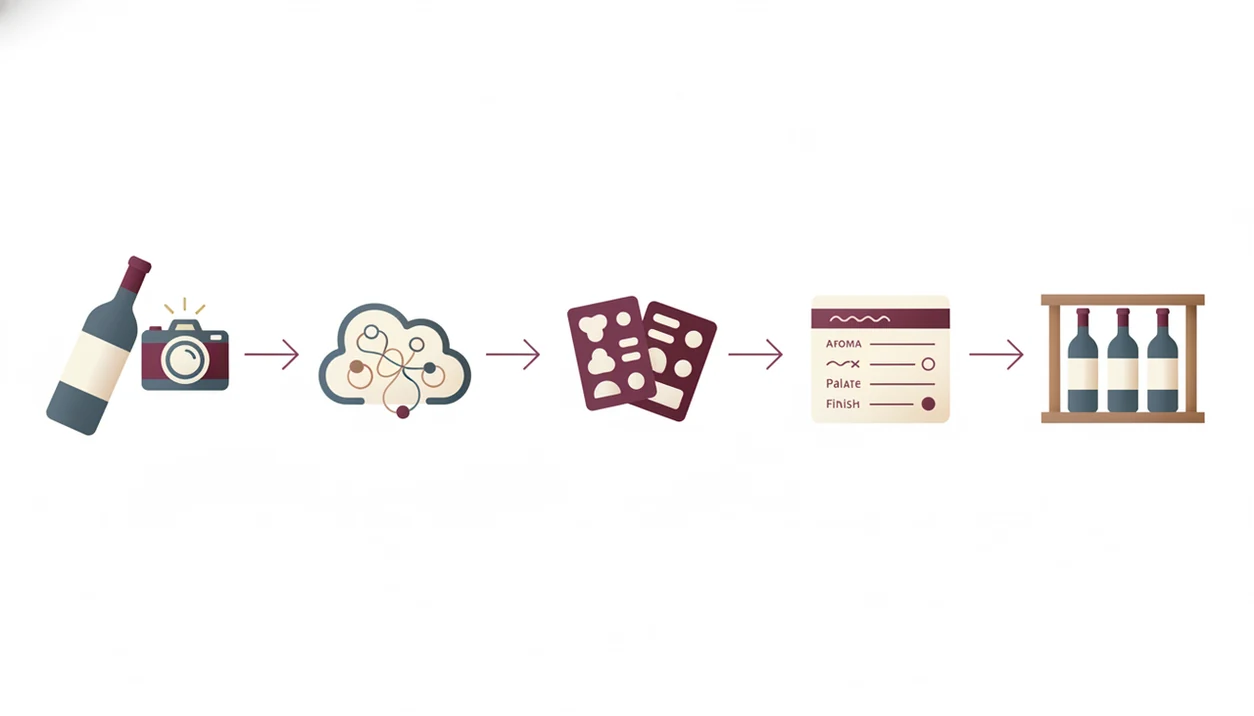
A free tasting app works by turning a label image into bottle data, then attaching your rating and tasting note to that record. The scan is only the first step; the saved note is what makes the record useful later.
- OCR reads the label text. Optical character recognition extracts producer, region, grape, vintage, and cuvée text from the photo.
- The app matches that text to a database. Database quality decides whether the label match is specific or vague.
- Structured note fields improve recall. Aroma, palate, finish, score, and rebuy fields are easier to search than one long paragraph.
- Crowd ratings feed recommendation logic. They can guide discovery, but they are not expert evaluations.
- Scan accuracy changes by context. Lighting, label design, vintage depth, and photo angle all affect the confidence signal.
Good divino ai wine identification and sommelier app workflows deliver bottle context and guided note capture, not instant expertise in a shiny wrapper. If you want a reusable note structure, the wine tasting journal app framework is a better starting point than a scanner-only workflow.
How To Use a Free Wine Tasting Notes App Effectively
Better results come from slowing down for thirty seconds before saving the note. A rushed scan can store the wrong vintage, and that error follows every future comparison.
- Scan the label in good lighting. Hold the phone steady and avoid glare, especially on foil or glossy labels.
- Verify the bottle match. Check vintage, producer, region, and cuvée before saving anything.
- Rate appearance, aroma, palate, and finish. Use built-in fields or a simple template if the free tasting app only gives free text.
- Add a photo and a rebuy verdict. “Would buy again with roast chicken” is more useful than a lonely 4-star score.
- Tag the occasion or pairing. Dinner, blind tasting, charcuterie, or weekday bottle tags make notes easier to filter.
- Export or back up notes periodically. Do this if the app allows it, before your free plan becomes a lock-in problem.
If the app feels too open-ended, use a basic how to write wine tasting notes structure before choosing your final journal.
How We Picked These 5 Free Wine Journal Apps
We picked these apps by testing the parts that matter after the scan: free-tier generosity, label scan accuracy, structured tasting-note fields, cellar tracking, data export, and privacy policy. Platform availability also mattered, so iOS and Android support were checked where relevant.
For export and privacy checks, we reviewed each app’s current app-store listing, help pages, and privacy policy rather than relying only on marketing copy.
We separated wine discovery apps from true wine journal tools. That distinction changes the recommendation. A shopping-first app may scan well, but it can still be weak when you want to compare tannin, acidity, and finish across six tastings.
Small details counted. Cropping out the shelf price tag can also crop out a vintage clue, so apps that make verification easy scored better in practice.
If your priority is repeatable learning, a structured free wine journal is often more useful than the app with the largest crowd because your own notes become the dataset.
Wine Discovery App vs. Free Wine Journal: Why the Difference Matters
Does a label scanner count as a free wine journal? Not by itself. Label scanning identifies the bottle, but it does not create a useful tasting record unless the app helps you save sensory notes, context, and a future decision.
Discovery apps optimize for purchases, marketplace links, and crowd scores. A true free wine journal prioritizes aroma, palate, finish, export, and search across past notes. That difference shows up fast when someone asks, “Why did it suggest that bottle?” The answer should come from your preference feedback, not just a high average rating.
Community ratings can be helpful, but they are not substitutes for personal structured notes. A 4.2 crowd score will not tell you whether you disliked the pencil graphite scent in a red wine or loved the silky tannins after the second sip.
For beginners, a wine rating app for beginners should reduce guesswork without hiding the reason behind each suggestion.
Honest Cons of Every Free Wine Tasting Notes App
Every free wine tasting notes app has a catch. The right choice depends on which catch bothers you least.
- Vivino: Marketplace-first design, limited export, and no disciplined aroma, palate, and finish workflow.
- CellarTracker: Excellent depth, but the mobile interface feels dated and the scanner is weaker than Vivino for quick restaurant use.
- Delectable: Good for social sharing, but the smaller database and sporadic updates limit private journaling.
- Preferabli: Promising flavor matching, but the community and bottle-history depth are still smaller.
- DiVino: Newer entrant with a growing database, so edge-case labels may need human correction.
On days when you are comparing a by-the-glass column on a chalkboard, Wine Identifier App is useful because the menu scanner and tasting prompts keep the decision tied to food, style, and preference feedback. Still, CellarTracker remains stronger for long-running collector records.
Limitations
Free apps are useful, but the free plan is not the same as owning your wine data. Expect friction once your notes become serious.
- Feature caps can appear quickly if you taste weekly or scan many bottles during shopping.
- Label recognition can fail on lesser-known producers, older vintages, damaged labels, or poor photos.
- Crowdsourced ratings are not objective quality measures and may reward popularity over fit.
- Buying-first apps can feel cluttered when you only want a clean free wine journal.
- Scan-first convenience and serious tasting-note structure rarely come equally well in one free tool.
- Data export is often limited or locked behind a paid tier, which creates vendor lock-in.
- Privacy policies vary, and some apps may share tasting behavior with merchants or advertising partners.
- Menu scans can confuse similar terms when “Sancerre” and “Sangiovese” sit two lines apart in tiny serif type.
For people building a long-term tasting habit, the most durable setup is a tool that verifies the bottle, captures structured notes, and lets you recover your data later.
FAQ
Is Vivino completely free?
Vivino has a free tier for scanning, ratings, and basic discovery. Some advanced features, marketplace elements, or data flexibility may require paid access or have limits.
Can I export notes from free wine apps?
Export options vary widely across free wine apps. CellarTracker is generally stronger for data access, while many mobile-first discovery apps limit CSV or PDF export.
Which free wine app works offline?
Most free wine apps require internet access for label scanning because they match photos against online databases. Some may allow offline note entry, then sync later.
Do free wine apps sell my data?
Some wine apps may share tasting behavior, purchase intent, or profile data with wine merchants or advertising partners. Always check the privacy policy before logging sensitive purchase habits.
Are wine app label scans accurate?
Wine app label scans are mixed; Jancis Robinson found Vivino fully accurate on 2 of 5 test labels and still stronger than the tested alternatives. Accuracy depends on label clarity, lighting, vintage coverage, and database quality.
Is there a free WSET tasting notes app?
No major free app fully replicates the WSET Systematic Approach to Tasting. Some apps offer structured fields that can support WSET-style practice.
What is the best free wine app for Android?
Vivino, CellarTracker, Preferabli, and DiVino have Android availability or Android-accessible workflows. Vivino is strongest for quick crowd ratings, while CellarTracker is stronger for detailed records.
How many wines can I log for free?
Free logging limits depend on the app and can change by plan. Check current scan, cellar, and note limits before committing hundreds of tasting records.